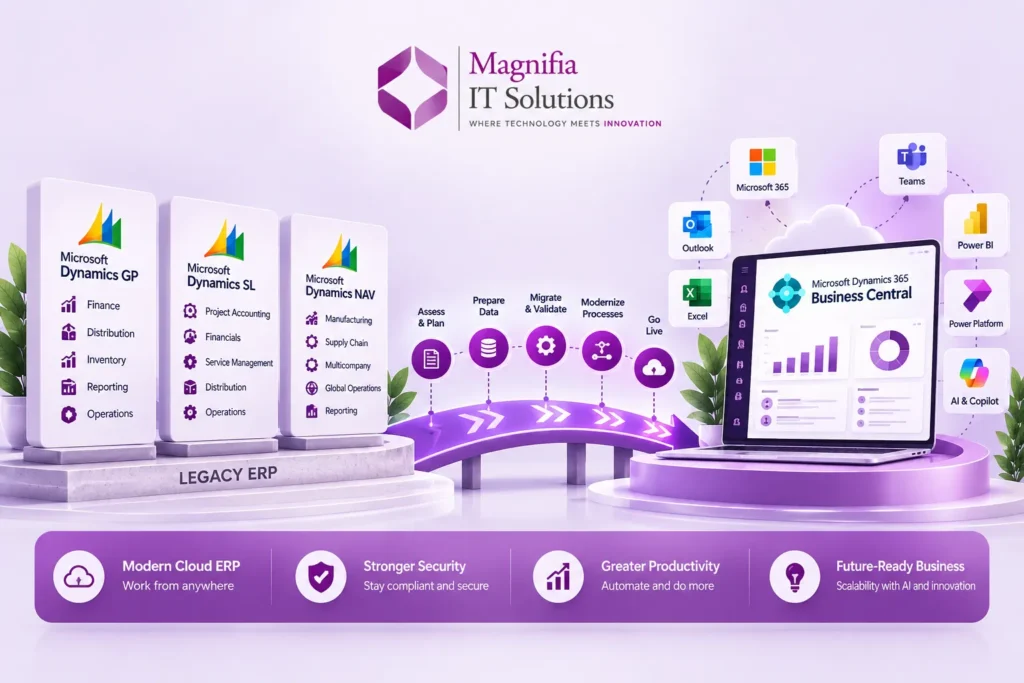
Introduction
Microsoft Dynamics GP, Dynamics SL, and Dynamics NAV have supported thousands of businesses across finance, accounting, inventory, distribution, manufacturing, projects, services, and operations for many years.
However, the ERP landscape is changing rapidly.
Businesses increasingly need cloud accessibility, connected applications, stronger security, automation, artificial intelligence, real-time reporting, and easier integration with modern business tools.
For organizations still running Dynamics GP, Dynamics SL, or Dynamics NAV, 2026 is an important time to evaluate their long-term ERP strategy.
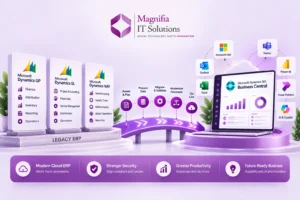
Microsoft is actively directing customers toward modern cloud solutions, including Dynamics 365 Business Central, as part of the transition away from legacy ERP platforms. Microsoft describes Business Central as a cloud ERP platform designed to support finance, operations, inventory, sales, service, manufacturing, projects, AI-powered productivity, and connected business processes.
The good news is that modernization does not necessarily mean starting from zero.
Microsoft provides migration and upgrade paths for supported Dynamics GP, NAV, and SL environments, although the exact approach depends on the version, customizations, data, integrations, and business requirements.
This guide explains the major Dynamics GP, SL, and NAV to Business Central migration options in 2026, what businesses should prepare, how data migration works, and how to plan a successful ERP modernization project.
Why Are Businesses Modernizing Dynamics GP, SL, and NAV?
Legacy ERP systems can continue to support important business processes, but maintaining older platforms can become increasingly challenging.
Organizations may encounter:
- Aging infrastructure
- Increasing maintenance requirements
- Limited cloud capabilities
- Older customizations
- Complex integrations
- Manual reporting processes
- Difficulty accessing ERP remotely
- Data silos
- Limited automation
- Higher IT administration requirements
- Challenges adopting modern AI capabilities
Microsoft’s current guidance highlights cloud modernization, security, connected data, AI-powered productivity, continuous updates, and reduced infrastructure complexity as reasons organizations are evaluating Business Central.
Modernization is therefore not simply about replacing an old ERP.
It is an opportunity to examine how the business operates today and determine how technology can support its next stage of growth.
What Is Dynamics 365 Business Central?
Microsoft Dynamics 365 Business Central is a cloud ERP solution designed primarily for small and midsize organizations.
It brings together business functions such as:
- Financial management
- Accounting
- Sales
- Purchasing
- Inventory
- Supply chain
- Manufacturing
- Project management
- Service management
- Warehouse management
- Reporting and analytics
Business Central also integrates with Microsoft’s broader ecosystem, including Microsoft 365, Outlook, Teams, Power Platform, Power BI, and Azure.
Microsoft describes Business Central as a modern cloud ERP foundation that provides connected business processes, real-time visibility, AI capabilities, and continuous updates.
For companies already using Microsoft technologies, this ecosystem can be an important part of the modernization strategy.
Dynamics GP to Business Central Migration
Microsoft has announced that Dynamics GP product enhancements, regulatory updates, and technical support will end on December 31, 2029, while security updates and patches are planned to continue until April 30, 2031.
That does not mean every GP customer needs to migrate immediately.
However, it gives businesses a defined timeframe in which to evaluate their options, plan their modernization strategy, and avoid making a rushed ERP decision later.
Microsoft provides migration capabilities for supported Dynamics GP versions to Business Central online. Microsoft’s current migration guidance states that Dynamics GP 2015 and later can use built-in migration tools under specified technical requirements.
The migration process can include important business information such as:
- Fiscal periods
- Chart of accounts
- Customers
- Vendors
- Receivables
- Payables
- Inventory
- Checkbook information
- Historical information
Microsoft provides detailed documentation about the GP data that can be migrated through its cloud migration tools.
The exact migration scope should be determined during assessment rather than assuming that every historical record and customization should automatically move.
Dynamics NAV to Business Central Migration
Dynamics NAV has been an important ERP platform for small and midsize businesses for many years.
The final Dynamics NAV version was released in 2017, and Microsoft lists the extended support end date for NAV 2018 as January 12, 2028.
Microsoft provides supported migration paths from NAV to Business Central online.
However, NAV migrations can be technically more involved because many businesses have significant historical customizations.
Microsoft’s documentation explains that organizations can follow either a full migration approach or a reimplementation approach depending on their environment and requirements. Microsoft Learn
Full Migration
A full migration attempts to move the existing data and relevant customizations into the modern Business Central environment.
This requires careful handling of legacy customizations.
NAV customizations written in C/AL may need to be converted to AL extensions as part of the modernization process. Microsoft specifically notes that data from tables containing code customizations cannot simply be carried forward unless those customizations are converted appropriately.
Reimplementation
A reimplementation takes a different approach.
Instead of carrying every historical customization into the new ERP, the organization creates a modern Business Central environment and migrates the business information that is actually required.
This may include:
- Master data
- Opening balances
- Selected historical transactions
- Customers
- Vendors
- Items
- Chart of accounts
- Required configuration
For some businesses, reimplementation provides an opportunity to simplify processes instead of reproducing years of legacy complexity.
Dynamics SL to Business Central Migration
Dynamics SL has traditionally been used by organizations with strong project accounting, financial management, distribution, and service requirements.
Microsoft lists July 12, 2028 as the extended support end date for Dynamics SL 2018.
Microsoft provides a cloud migration path from supported Dynamics SL environments to Business Central online.
The migration can include information such as:
- Fiscal periods
- Chart of accounts
- Customers
- Vendors
- Receivables
- Payables
- Inventory
- Project information
- Selected historical information
Microsoft’s documentation specifically identifies project master information from the Project Controller module among the SL data that can be migrated.
Because Dynamics SL environments can contain highly customized project and financial processes, an assessment should be performed before determining the final migration architecture.
Dynamics GP vs NAV vs SL: What Is the Migration Difference?
Although all three platforms are legacy Microsoft Dynamics ERP systems, the migration process is not identical.
| Legacy ERP | Modernization Path | Key Consideration |
|---|---|---|
| Dynamics GP | Business Central | Data migration, integrations, customizations |
| Dynamics NAV | Business Central | Version, C/AL customizations, extensions |
| Dynamics SL | Business Central | Projects, finance, data migration |
| Legacy custom systems | Business Central or custom solution | Detailed technical assessment |
Microsoft provides separate migration guidance for GP, NAV, and SL because their architectures, versions, data structures, and customization models differ.
This is why businesses should avoid treating ERP migration as a simple database transfer.
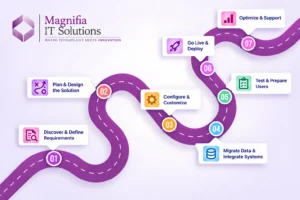
Step-by-Step Dynamics GP, SL & NAV Modernization Roadmap
Step 1: Assess the Existing ERP
Begin by documenting the current environment.
Review:
- ERP version
- Database
- Number of companies
- Users
- Modules
- Customizations
- Integrations
- Reports
- Workflows
- Historical data
- Third-party applications
- Infrastructure
Microsoft recommends assessing the current ERP environment before defining the migration approach.
Step 2: Identify Business Requirements
Next, identify what the business actually needs from the new ERP.
Ask:
- Which processes work well today?
- Which processes are inefficient?
- Which reports are essential?
- Which integrations are business-critical?
- Which customizations are still required?
- Which legacy features are no longer needed?
This step prevents the organization from automatically rebuilding outdated processes.
Step 3: Decide Between Migration and Reimplementation
This is one of the most important decisions.
A migration attempts to preserve more of the existing environment.
A reimplementation creates a cleaner Business Central environment and migrates only the information and processes that are required.
The correct approach depends on:
- ERP version
- Data volume
- Customization level
- Business complexity
- Historical data requirements
- Integration requirements
- Budget
- Timeline
Step 4: Clean and Prepare Data
Data quality has a major impact on ERP migration.
Before moving data, identify:
- Duplicate customers
- Duplicate vendors
- Inactive accounts
- Incorrect addresses
- Old inventory
- Unused items
- Invalid account mappings
- Incomplete master data
- Historical records
Migrating poor-quality data into a new ERP simply transfers the problem.
A successful Business Central migration should include data cleansing before the production migration.
Step 5: Map Legacy Data to Business Central
Data mapping determines how information from the existing ERP will appear in Business Central.
For example:
Legacy ERP
Customer → Customer
Vendor → Vendor
Item → Item
Chart of Accounts → Chart of Accounts
Sales Order → Sales Order
Purchase Order → Purchase Order
However, real-world migration is more complex.
Custom fields, historical transactions, dimensions, financial structures, inventory information, and third-party data may require transformation.
Microsoft provides specific migration tools and documentation for supported GP, NAV, and SL scenarios.
Step 6: Review Customizations
Customizations are often one of the biggest challenges in ERP modernization.
A business may have accumulated custom functionality over 10 or 15 years.
Instead of asking:
“How do we copy every customization?”
ask:
“Does the business still need this functionality?”
Some customizations may be replaced by standard Business Central functionality.
Others may be rebuilt using:
- AL extensions
- Power Platform
- Power Automate
- APIs
- Business Central apps
- Custom integrations
This can produce a cleaner and easier-to-maintain ERP environment.
Step 7: Rebuild Integrations
Most modern businesses have several systems connected to their ERP.
Examples include:
- CRM
- E-commerce
- Payment gateways
- Payroll
- Banking
- Warehouse systems
- Shipping platforms
- Power BI
- Microsoft 365
- External APIs
During migration, each integration should be reviewed.
Determine whether it should be:
Migrated → Rebuilt → Replaced → Removed
This can significantly simplify the final architecture.
Step 8: Perform Test Migration
Before moving production data, conduct a test migration.
A typical test includes:
- Export or replicate required data.
- Transform the data.
- Import into Business Central.
- Validate records.
- Test processes.
- Review reports.
- Identify errors.
- Correct mappings.
- Repeat.
Microsoft’s GP cloud migration documentation includes validation processes for comparing migrated data with the source environment.
Testing should cover both technical data accuracy and actual business workflows.
Step 9: User Acceptance Testing
Users should test the new ERP before go-live.
Finance teams should test accounting processes.
Sales teams should test orders and customers.
Warehouse teams should test inventory and shipping.
Project teams should test project-related processes.
Management should validate reporting and dashboards.
User acceptance testing helps identify problems that technical migration tests may not reveal.
Step 10: Go Live With Business Central
After successful testing, the organization can prepare for production deployment.
The go-live plan should include:
- Final data migration
- User setup
- Security roles
- Integrations
- Reports
- Opening balances
- Business processes
- User training
- Support procedures
- Backup and recovery planning
A controlled go-live minimizes business disruption.
Business Central Migration: What Data Should You Move?
Not every historical record necessarily needs to move into the new ERP.
Businesses should categorize information into three groups.
Essential Data
Information required for daily operations:
- Customers
- Vendors
- Items
- Open transactions
- Balances
- Current orders
- Current projects
Useful Historical Data
Information required for reporting, compliance, or customer service.
Archive Data
Old information that does not need to exist directly inside the operational ERP.
This approach can reduce migration complexity and improve the usability of the new system.
What Happens to Legacy Customizations?
This is one of the biggest questions businesses have during a Dynamics GP, NAV, or SL migration.
The answer depends on the customization.
Some custom functionality may already exist as standard Business Central functionality.
Other functionality may require:
- Business Central extensions
- AL development
- Power Automate workflows
- Power Apps
- APIs
- Integration platforms
- Third-party Business Central apps
For NAV customers specifically, Microsoft documents that C/AL customizations need to be handled through the modern extension model when following applicable upgrade paths.
The modernization process should therefore evaluate every customization rather than automatically rebuilding everything.
Why Businesses Are Moving to Cloud ERP
Moving from an on-premises ERP to Business Central online can change how organizations manage infrastructure.
Instead of managing many infrastructure components themselves, businesses can use Microsoft’s cloud environment.
Potential benefits include:
- Cloud accessibility
- Continuous updates
- Reduced infrastructure management
- Easier scalability
- Microsoft ecosystem integration
- Modern security capabilities
- AI and automation capabilities
- Power Platform connectivity
- Real-time business visibility
Microsoft specifically highlights continuous updates, cloud scalability, Microsoft 365 integration, AI capabilities, and reduced IT complexity as benefits of moving toward Business Central.
How Long Does a Dynamics Migration Take?
There is no single migration timeline that applies to every business.
A small, relatively standard ERP environment may require substantially less work than a heavily customized multi-company ERP with numerous integrations.
Timeline depends on:
- Number of users
- Number of companies
- ERP version
- Data volume
- Customizations
- Integrations
- Reporting requirements
- Manufacturing complexity
- Project accounting
- Data quality
- Testing requirements
- User training
The best way to estimate a project is through an initial Dynamics ERP migration assessment.
Common Mistakes to Avoid
Migrating Everything
More data does not automatically mean a better migration.
Move what the business needs.
Rebuilding Every Customization
Old customizations may have been created to solve problems that Business Central already addresses.
Ignoring Data Quality
Poor data can create operational problems after go-live.
Underestimating Integrations
External systems can become major migration dependencies.
Skipping User Testing
Users should validate real business scenarios before deployment.
Leaving Migration Planning Until the Last Minute
Support deadlines and business requirements should be considered early.
Is 2026 the Right Time to Start Dynamics ERP Modernization?
For organizations running Dynamics GP, NAV, or SL, 2026 provides a useful opportunity to evaluate modernization options.
Microsoft has published current migration guidance for all three platforms and is encouraging legacy ERP customers to evaluate Business Central and other modern Dynamics 365 solutions.
The important point is not simply the support deadline.
ERP modernization can take significant planning.
Businesses need time to:
- Assess the current system
- Clean data
- Review customizations
- Select a migration approach
- Build integrations
- Test Business Central
- Train employees
- Plan go-live
Starting early gives organizations more time to make these decisions carefully.
Final Thoughts
The transition from Dynamics GP, Dynamics SL, or Dynamics NAV to Dynamics 365 Business Central is more than an ERP upgrade.
It is an opportunity to modernize finance, operations, reporting, integrations, automation, and business processes.
Microsoft currently provides migration guidance and tools for supported GP, NAV, and SL environments, but the appropriate approach depends on the specific version, data, customizations, integrations, and business requirements.
For some organizations, a full migration may be appropriate.
For others, reimplementation may provide a cleaner path.
The most important step is to assess the existing ERP before choosing the migration strategy.
A successful Dynamics GP to Business Central migration, Dynamics NAV to Business Central migration, or Dynamics SL to Business Central migration should focus not only on moving data but also on improving the way the business operates.
For organizations planning ERP modernization in 2026, Business Central provides a modern Microsoft cloud ERP platform around which finance, operations, automation, analytics, and connected business applications can be built.
Magnifia IT Solutions can help organizations assess legacy Dynamics environments, plan Business Central migration strategies, handle data and customization requirements, build integrations, configure Business Central, and support testing and implementation.
Frequently Asked Questions
Can Dynamics GP be migrated to Business Central?
Yes. Microsoft provides cloud migration capabilities for supported Dynamics GP versions. The exact requirements and migration scope depend on the GP version and environment.
Can Dynamics NAV be migrated to Business Central?
Yes. Microsoft provides supported migration and upgrade paths from Dynamics NAV to Business Central online. Older NAV versions may require intermediate upgrade steps.
Can Dynamics SL be migrated to Business Central?
Yes. Microsoft provides a documented cloud migration path from supported Dynamics SL environments to Business Central online.
What happens to Dynamics GP after 2029?
Microsoft states that product enhancements, regulatory updates, and technical support for Dynamics GP end on December 31, 2029, while security updates and patches are planned through April 30, 2031.
When does Dynamics NAV 2018 support end?
Microsoft lists January 12, 2028 as the extended support end date for Dynamics NAV 2018.
When does Dynamics SL 2018 support end?
Microsoft lists July 12, 2028 as the extended support end date for Dynamics SL 2018.
Should businesses migrate all historical data?
Not necessarily. Businesses should determine which historical data is operationally, legally, financially, or analytically required before deciding what to migrate.
Is Business Central suitable for small and midsize businesses?
Microsoft positions Business Central as a business management solution for small and midsize organizations, covering areas including finance, manufacturing, sales, shipping, projects, and services.
What is the first step in Dynamics GP, SL, or NAV modernization?
The first step should be an assessment of the current ERP environment, including its version, data, customizations, integrations, reports, users, and business processes. Microsoft also recommends assessment and planning before defining the migration approach.