
Introduction
Small and midsize businesses often reach a point where spreadsheets, disconnected applications, and manual processes make everyday operations increasingly difficult to manage. Finance may work in one system, inventory in another, sales teams may depend on spreadsheets, and management may have to wait for reports before making important decisions.
This is where an enterprise resource planning system can make a significant difference.
Microsoft Dynamics 365 Business Central is a cloud-based business management and ERP solution designed specifically for small and midsize organizations. Microsoft describes Business Central as an end-to-end solution covering areas such as finance, sales, service, supply chain, manufacturing, projects, and operations.
For SMBs looking to replace disconnected systems with a more integrated platform, Business Central provides a way to bring core business processes together while maintaining flexibility as the company grows.
In this guide, we will explore Dynamics 365 Business Central for SMBs, its major features, current India pricing, benefits, implementation considerations, and how businesses can determine whether Business Central is the right ERP platform for their needs.
What Is Microsoft Dynamics 365 Business Central?
Microsoft Dynamics 365 Business Central is an ERP and business management platform built for small and midsize businesses.
It helps organizations manage financials, sales, purchasing, inventory, supply chain operations, projects, service processes, and manufacturing from a connected environment.
Instead of maintaining separate applications for different departments, organizations can use Business Central to connect business information and processes.
Microsoft states that Business Central is built and optimized for small and medium-sized businesses, particularly organizations that have outgrown entry-level accounting or business systems or are replacing legacy solutions.
The platform is also part of the wider Microsoft ecosystem, allowing organizations to connect Business Central with applications such as Microsoft 365, Outlook, Excel, Teams, Power Platform, and Power BI.
This ecosystem can be particularly useful for SMBs that already rely heavily on Microsoft technologies.
Why Are SMBs Considering Business Central?
As a business grows, operational complexity usually grows with it.
A company may start with spreadsheets and basic accounting software. Over time, it may add CRM software, inventory tools, payroll systems, ecommerce platforms, reporting tools, and custom applications.
Although each application can solve a particular problem, the organization can eventually face another problem: disconnected data.
For example, a sales team may create an order while the inventory team has limited visibility into stock. Finance may receive information later, while management waits for manually prepared reports.
Business Central is designed to bring many of these processes into one connected platform.
Microsoft highlights capabilities covering financial management, sales, inventory, purchasing, supply chain, project management, warehouse management, manufacturing, and service operations.
Key Dynamics 365 Business Central Features for SMBs
1. Financial Management
Financial management is one of the core capabilities of Business Central.
Businesses can manage areas such as:
- General ledger
- Accounts payable
- Accounts receivable
- Budgets
- Fixed assets
- Cash flow
- Bank reconciliation
- Financial reporting
- Multiple companies
- Multiple currencies
Having financial information connected to operational transactions can help finance teams reduce manual data entry and improve visibility into business performance.
Microsoft also highlights AI-assisted financial capabilities, including cash-flow forecasting and automated invoice-related processes.
2. Sales Management
Business Central can help organizations manage sales processes from quotations and orders through fulfillment and invoicing.
Sales teams can work with customer information while connected to other operational data.
This can help businesses gain visibility into:
- Customers
- Sales orders
- Quotes
- Pricing
- Items
- Availability
- Shipments
- Invoices
- Customer history
For businesses that have growing sales volumes, connecting sales and operational data can reduce the need for teams to manually exchange information between systems.
3. Inventory Management
Inventory management becomes increasingly important as an SMB grows.
Business Central provides inventory functionality that can help organizations monitor stock, availability, replenishment, and product movements.
Businesses can manage information related to:
- Items
- Stock levels
- Warehouses
- Locations
- Purchase orders
- Sales orders
- Transfers
- Replenishment
- Inventory valuation
Microsoft also highlights AI-powered sales and inventory forecasting capabilities designed to help businesses make replenishment decisions based on demand and availability.
4. Supply Chain Management
For businesses that purchase products or materials from suppliers, supply chain visibility is essential.
Business Central supports purchasing, vendor management, fulfillment, inventory, warehouse operations, and related processes.
The platform can help connect purchasing activity with inventory and financial information rather than treating each process as an isolated activity.
Microsoft also lists vendor management, purchasing, order fulfillment, returns, and ecommerce integration among its supply-chain capabilities.
5. Project Management
Professional services and project-based businesses need more than accounting software.
Business Central provides project management capabilities that can help organizations track:
- Projects
- Tasks
- Budgets
- Resources
- Timesheets
- Costs
- Billing
- Project profitability
Microsoft specifically highlights project costing, budgeting, resource utilization, reporting, and project profitability capabilities.
6. Manufacturing
Manufacturing businesses can use Business Central to manage production-related processes.
Microsoft’s current Business Central capabilities include manufacturing functionality such as bills of materials, production orders, and assembly-related processes. Manufacturing capabilities are included in the Premium plan.
This makes Business Central relevant for SMB manufacturers that need their production, inventory, purchasing, and financial processes to work together.
7. Warehouse Management
Warehouse operations can become difficult to manage when businesses rely heavily on spreadsheets or disconnected inventory systems.
Business Central provides warehouse functionality for processes such as inventory movement, picking, put-away, and barcode-supported operations.
This can help organizations create greater visibility between warehouse activity and their broader inventory and order processes.
8. Microsoft 365 Integration
One of the major advantages for businesses already using Microsoft technologies is the integration between Business Central and Microsoft 365.
Business Central can work with applications such as:
- Outlook
- Excel
- Microsoft Teams
- Power BI
- Power Platform
Microsoft states that Business Central connects with Outlook, Excel, and Teams so users can access and work with business information without constantly switching applications.
For SMBs already using Microsoft 365, this connected ecosystem can be an important consideration when evaluating ERP platforms.
9. AI and Copilot
AI is becoming an increasingly important part of modern ERP platforms.
Business Central includes Microsoft Copilot capabilities designed to assist users with tasks such as analyzing information, generating suggestions, summarizing data, and supporting business workflows.
Microsoft’s current Business Central roadmap also includes continued development around Copilot and autonomous agents.
Examples include assistance with data analysis, bank reconciliation, vendor invoice processing, and sales order processes.
AI capabilities should still be evaluated against an organization’s actual processes, data quality, governance requirements, and licensing model rather than treated as a replacement for proper ERP implementation.
Dynamics 365 Business Central Pricing
Pricing is one of the most important factors for SMBs evaluating Business Central.
As of the current Microsoft India pricing page, the main Business Central plans are:
| Plan | India list price shown by Microsoft | Key positioning |
|---|---|---|
| Business Central Essentials | ₹6,655/user/month, paid yearly | Finance, sales and core operations |
| Business Central Premium | ₹9,150/user/month, paid yearly | Essentials plus service management and manufacturing |
| Team Members | ₹665/user/month, paid yearly | Limited access and selected tasks |
Microsoft states that GST is extra as applicable.
The Essentials plan includes core capabilities such as finance management, sales and marketing, fulfillment, purchasing, inventory, supply chain planning, project management, and warehouse management. Premium adds service order management and manufacturing capabilities.
Microsoft also offers a 30-day free trial.
Pricing can change, and the final cost of an ERP project is not simply the software subscription. Businesses should also consider implementation, configuration, data migration, integrations, customization, training, support, and any additional applications or services required.
Microsoft’s pricing page also notes that displayed prices are informational and that actual pricing can vary based on country, currency, and regional factors.
Business Central Essentials vs Premium
One of the common questions SMBs ask is which Business Central license they need.
Business Central Essentials is designed for organizations that primarily need financial management, sales, purchasing, inventory, supply chain, projects, and related core business functionality.
Business Central Premium includes the Essentials capabilities while adding enhanced functionality for service management and manufacturing.
Therefore, a manufacturing company or an organization with significant service operations may need to evaluate Premium, while another business may find the Essentials functionality more aligned with its current requirements.
The right licensing model depends on the organization’s processes and user roles.
Benefits of Dynamics 365 Business Central for SMBs
Connected Business Data
Instead of maintaining separate data sources across departments, Business Central can provide a more connected view of business operations.
Better Financial Visibility
Finance teams can connect financial information with sales, purchasing, inventory, and other operational transactions.
Improved Operational Efficiency
Automating repetitive workflows can reduce manual work and help employees spend more time on higher-value activities.
Scalable ERP Platform
Business Central is designed to support businesses as they grow and provides cloud scalability through Microsoft infrastructure.
Flexible Integrations
Businesses can extend Business Central through Microsoft Power Platform, Microsoft 365, APIs, and marketplace applications.
Mobile Accessibility
Microsoft states that Business Central supports desktop, tablet, and mobile access across major operating systems.
Global Capabilities
Business Central supports multiple languages, currencies, countries, and regional requirements, making it suitable for businesses expanding into new markets. Microsoft currently states that it is available in more than 50 languages and 157 countries.
Business Central Implementation for SMBs
Selecting an ERP is only the beginning.
Successful implementation requires careful planning.
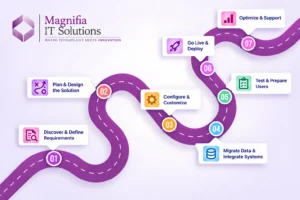
A typical Business Central implementation may include the following stages:
1. Business Process Discovery
Understand current workflows, challenges, users, systems, reports, and business requirements.
2. Solution Design
Map business requirements to Business Central functionality and identify areas requiring configuration, extensions, or integrations.
3. Data Migration
Identify the data that needs to be migrated, clean it, map it to Business Central structures, and validate the migrated information.
4. Configuration
Configure financial, sales, purchasing, inventory, warehouse, project, manufacturing, or service processes based on the organization’s requirements.
5. Integration
Connect Business Central with required systems such as ecommerce platforms, CRM applications, payroll systems, payment solutions, or other business applications.
6. Testing
Test business processes using realistic scenarios and data before going live.
7. User Training
Train employees according to their roles and workflows.
8. Go-Live and Support
Deploy the solution, monitor business processes, resolve issues, and provide ongoing optimization and support.
A structured implementation approach can help organizations avoid unnecessary customization and focus on processes that create measurable business value.
Is Dynamics 365 Business Central Right for Your SMB?
Business Central may be worth evaluating if your organization is experiencing challenges such as:
- Growing financial complexity
- Multiple disconnected business applications
- Manual spreadsheet-based processes
- Poor inventory visibility
- Increasing order volumes
- Difficult financial reporting
- Multiple warehouses or locations
- Manufacturing requirements
- Project-based operations
- Need for stronger management reporting
- Plans for business expansion
However, ERP selection should always start with business requirements rather than the software name.
A proper assessment should consider your current processes, number of users, industry, integrations, data volume, compliance requirements, budget, growth plans, and internal technical capabilities.
Common Mistakes SMBs Should Avoid
One of the biggest ERP implementation mistakes is trying to customize everything.
Businesses should first determine whether Business Central already provides the required functionality through standard configuration.
Another common mistake is migrating unnecessary or poor-quality historical data.
User training is another important area. Even a technically successful implementation can struggle if employees do not understand how new processes work.
Finally, businesses should not evaluate only the license price. The total ERP investment can include implementation, data migration, integrations, custom development, training, support, and ongoing optimization.
How Magnifia IT Solutions Can Help
Choosing and implementing an ERP system requires more than simply purchasing licenses.
Magnifia IT Solutions can help businesses evaluate their requirements, plan their Dynamics 365 Business Central implementation, configure business processes, integrate existing applications, migrate data, support testing, train users, and provide ongoing assistance.
A structured approach can help SMBs move from disconnected business processes toward a more integrated digital environment.
Whether you are replacing legacy software, moving away from spreadsheets, modernizing finance operations, or connecting sales and supply chain processes, Business Central can provide a foundation for a broader digital transformation strategy.
Conclusion
Dynamics 365 Business Central for SMBs provides a comprehensive ERP platform for organizations looking to connect finance, sales, purchasing, inventory, supply chain, projects, manufacturing, and service operations.
Its Microsoft 365 integration, cloud architecture, extensibility, analytics, automation, and growing AI capabilities make it a relevant platform for businesses planning to modernize their operations.
For organizations in India, Microsoft’s current pricing page lists Business Central Essentials at ₹6,655 per user/month and Premium at ₹9,150 per user/month, paid yearly, with GST extra.
However, selecting the right ERP should not be based on licensing price alone. The most important factors are business requirements, implementation strategy, data quality, integrations, user adoption, scalability, and long-term support.
For SMBs considering Microsoft Dynamics 365 Business Central, the next step is to evaluate current business processes and identify which areas can be improved through automation, integration, and centralized data.
Looking for Dynamics 365 Business Central implementation and consulting support? Contact Magnifia IT Solutions to discuss your business requirements and implementation roadmap.
FAQ
What is Dynamics 365 Business Central?
Dynamics 365 Business Central is Microsoft’s cloud-based ERP and business management solution designed for small and midsize organizations. It supports finance, sales, purchasing, inventory, supply chain, projects, service, manufacturing, and other business processes.
How much does Dynamics 365 Business Central cost in India?
Microsoft’s current India pricing page lists Essentials at ₹6,655 per user/month and Premium at ₹9,150 per user/month, both paid yearly, with GST extra. Actual pricing can vary by licensing and regional factors.
What is the difference between Business Central Essentials and Premium?
Essentials provides core business management capabilities. Premium includes the Essentials capabilities plus enhanced service management and manufacturing functionality.
Is Business Central suitable for small businesses?
Business Central is specifically designed and optimized for small and medium-sized organizations. It is particularly relevant for businesses that have outgrown basic accounting or disconnected business systems.
Does Business Central support manufacturing?
Yes. Manufacturing functionality is available in Business Central Premium, including capabilities for production-related processes.
Can Business Central integrate with Microsoft 365?
Yes. Business Central integrates with Microsoft applications including Outlook, Excel, and Teams, and can also connect with Power Platform and other business applications.
Does Business Central use AI?
Yes. Business Central includes Microsoft Copilot capabilities and continues to add AI-powered and agent-based functionality. Availability and licensing can vary by capability.
How long does a Business Central implementation take?
Implementation time depends on the number of users, business processes, data migration requirements, integrations, customizations, and organizational readiness. A proper discovery and solution-design phase should be completed before estimating the timeline.