Implementing a modern ERP or business management platform is a major step for any organization. Businesses need more than software installation. They need a structured approach that connects technology with business processes, data, people and long-term objectives.
Microsoft Dynamics 365 implementation can help organizations modernize finance, sales, customer service, supply chain, operations and other business processes through connected cloud applications. However, the outcome depends heavily on how the implementation is planned, configured, tested and adopted.
Microsoft’s current implementation guidance uses the Success by Design framework across five broad stages: Strategize, Initiate, Implement, Prepare and Operate. The framework is designed to help organizations plan, deploy and operate Dynamics 365 solutions in a structured way.
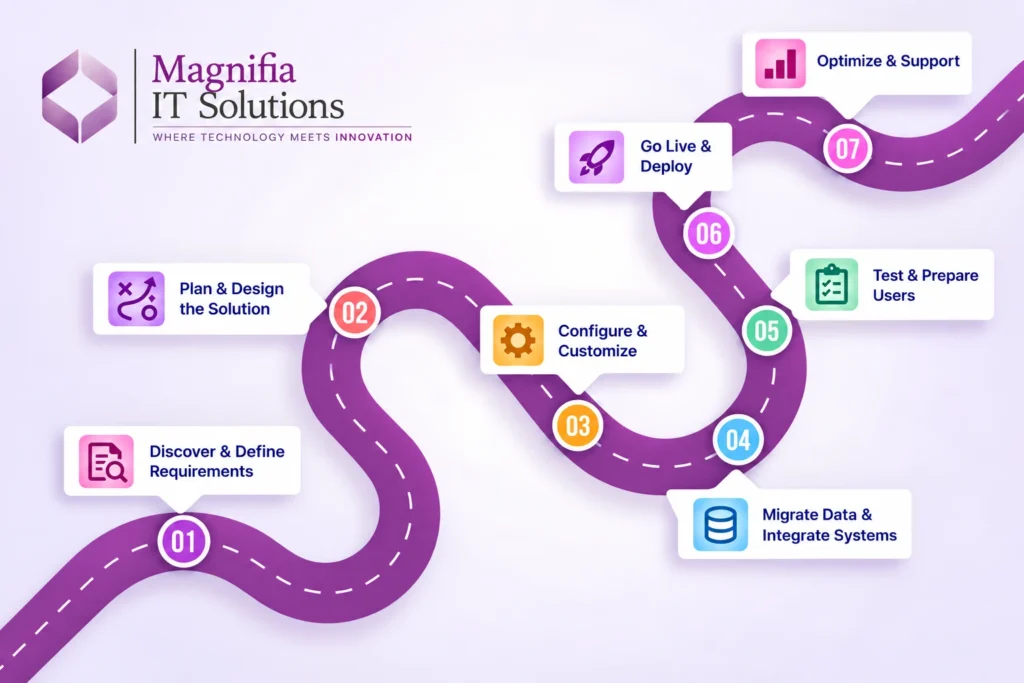
For businesses planning a Dynamics 365 project, this seven-step roadmap provides a practical way to understand the implementation process and the activities that typically happen from planning through post-go-live support.
What Is Microsoft Dynamics 365 Implementation?
Microsoft Dynamics 365 implementation is the process of introducing and configuring one or more Dynamics 365 applications to support an organization’s business requirements.
Depending on the business, an implementation may involve applications such as Dynamics 365 Finance, Supply Chain Management, Sales, Customer Service or Business Central, along with Microsoft Power Platform, Power BI, Microsoft 365, Azure and third-party systems.
A successful implementation normally involves much more than configuring screens and features. It can include:
- Business process analysis
- Requirement gathering
- Solution architecture
- Application configuration
- Customization
- Data migration
- System integration
- Security and user roles
- Testing
- Reporting and analytics
- User training
- Change management
- Go-live planning
- Post-go-live support
Microsoft’s implementation guidance specifically identifies areas such as business process mapping, application lifecycle management, data migration, integration, testing, training, cutover, reporting and business intelligence as important components of a project plan.
Why a Structured Dynamics 365 Implementation Roadmap Matters
Without proper planning, an implementation can become difficult to manage. Requirements can change, data can become inconsistent, integrations can create unexpected dependencies, and users may struggle to adopt the new system.
A structured roadmap helps project teams establish clear responsibilities, milestones and dependencies.
It also allows businesses to identify risks earlier instead of discovering them immediately before go-live.
Microsoft recommends an implementation strategy that is process-focused and user-centric, with attention to change management and user adoption rather than treating the project as simply a technology deployment.
The 7-Step Microsoft Dynamics 365 Implementation Roadmap
Step 1: Define Business Requirements and Objectives
The first step is understanding why the organization is implementing Dynamics 365.
Before selecting configurations or starting development, the project team should identify the business problems that need to be addressed.
Typical questions include:
- What business processes need improvement?
- Which departments will use Dynamics 365?
- What systems are currently being used?
- What problems exist with the current processes?
- What information does management need?
- Which processes should be automated?
- What integrations are required?
- What business outcomes should the project achieve?
For example, a company may want to improve financial visibility, automate procurement, improve inventory management, centralize customer information or connect sales and operations.
The project team should document current processes and define the desired future-state processes.
This stage creates the foundation for the entire Dynamics 365 implementation.
Step 2: Create the Implementation Strategy and Solution Design
Once business requirements are understood, the next step is designing the solution.
The solution design should determine which Dynamics 365 applications and capabilities are required and how they will work together.
The team should consider:
- Application architecture
- Business processes
- Environments
- Security
- Integration architecture
- Reporting requirements
- Data architecture
- Customization requirements
- User roles
- Application lifecycle management
Microsoft’s Success by Design approach emphasizes establishing a strong implementation strategy and solution architecture before major implementation activities are completed.
At this stage, businesses should also make an important decision about customization.
Not every business requirement requires custom development. Wherever possible, organizations should evaluate standard Dynamics 365 capabilities before introducing unnecessary customization.
A well-designed solution can make future upgrades, maintenance and support easier to manage.
Step 3: Configure and Customize Dynamics 365
After the solution design is approved, the implementation team begins configuring Dynamics 365.
Configuration may include:
- Company and organizational structures
- Financial settings
- Workflows
- Approval processes
- User roles
- Security permissions
- Business rules
- Sales processes
- Procurement processes
- Inventory settings
- Reporting
- Notifications
- Dashboards
Customization may be required when standard functionality does not fully support a specific business requirement.
However, customization should have a clear business purpose.
The goal should not be to recreate every existing process exactly as it currently works. Instead, the implementation should provide an opportunity to simplify processes and improve efficiency where appropriate.
Microsoft’s implementation guidance also emphasizes process-focused solutions and recommends delivering value early rather than relying on unnecessarily long implementation cycles.
Step 4: Migrate Data and Integrate Business Systems
Data migration is one of the most important parts of a Dynamics 365 implementation.
Businesses often have years of information stored across ERP systems, CRM platforms, spreadsheets, databases and other applications.
The migration process should therefore begin with understanding what data actually needs to move.
Common data categories include:
- Customers
- Vendors
- Products
- Employees
- Financial records
- Inventory
- Sales transactions
- Purchase records
- Historical information
A typical data migration process includes:
Data discovery → Data cleansing → Data mapping → Data transformation → Data migration → Validation
Poor-quality source data should not simply be transferred into the new system.
Duplicate records, incorrect values, outdated information and inconsistent formats should be identified and addressed before migration.
Integrations are equally important.
Dynamics 365 may need to communicate with:
- Banking systems
- E-commerce platforms
- CRM systems
- Payroll applications
- Warehouse systems
- Payment gateways
- Business intelligence platforms
- Microsoft 365
- Third-party applications
Microsoft’s implementation guidance specifically includes data management and integration with other solutions as key implementation areas.
Step 5: Test the Solution and Prepare Users
Testing should happen throughout the implementation rather than being treated as the final activity.
Testing can include:
- Functional testing
- Integration testing
- Data validation
- Security testing
- User acceptance testing
- Performance testing
- End-to-end business process testing
User acceptance testing is particularly important because business users need to confirm that the configured solution supports real-world processes.
For example, a finance team should be able to test a complete financial process rather than checking individual screens independently.
Users should also receive appropriate training.
Training can cover:
- How to access the system
- How to perform daily tasks
- Business process changes
- Security responsibilities
- Reporting
- Dashboards
- Common troubleshooting procedures
User adoption is an important part of implementation success because a technically functional system can still fail to deliver value if employees do not understand how to use it effectively.
Step 6: Go Live with a Controlled Deployment
Go-live is the point at which the Dynamics 365 solution becomes operational for the organization.
However, go-live should only happen after the project team has completed appropriate readiness activities.
Microsoft’s go-live guidance recommends completing activities such as integration testing, user acceptance testing and performance testing, preparing data migration and cutover plans, completing user training, assigning security roles and establishing production support.
A go-live checklist may include:
- Final data migration
- Data validation
- Production environment preparation
- Security verification
- User access verification
- Integration validation
- Final testing
- User training
- Cutover plan
- Backup and recovery planning
- Support team readiness
- Communication to users
Organizations can choose different deployment approaches depending on their requirements.
A company may launch the entire solution at once or roll it out by business unit, geography, process or application.
The right approach depends on project scope, organizational readiness, dependencies and risk management.
Step 7: Optimize, Support and Continuously Improve
The implementation does not end when the system goes live.
The post-go-live period is important for identifying issues, monitoring adoption and improving the solution.
The support phase may involve:
- User support
- Issue resolution
- Performance monitoring
- Security reviews
- Process optimization
- Reporting improvements
- Additional integrations
- Training updates
- System enhancements
- Release management
Microsoft’s implementation framework includes an Operate phase focused on maintaining the long-term health of the solution.
Organizations should also establish a process for evaluating future improvements.
As business requirements change, the Dynamics 365 environment may need additional capabilities, integrations, automation or reporting.
Microsoft Dynamics 365 Implementation Timeline
There is no single implementation timeline that applies to every organization.
The project duration depends on factors such as:
- Number of Dynamics 365 applications
- Number of users
- Business complexity
- Number of legal entities
- Data volume and quality
- Integration requirements
- Customization requirements
- Testing requirements
- Geographic rollout
- User training
- Change management
- Deployment strategy
A practical project can be organized into the following approximate phases:
| Phase | Typical activities |
|---|---|
| Discovery & Planning | Requirements, goals, scope and project planning |
| Solution Design | Architecture, processes and technical design |
| Configuration | Dynamics 365 setup and business process configuration |
| Development | Customization, extensions and integrations |
| Data Migration | Cleansing, mapping, migration and validation |
| Testing | Functional, integration, UAT and performance testing |
| Training & Preparation | User training, security and cutover preparation |
| Go-Live | Production deployment and final migration |
| Post-Go-Live | Support, optimization and continuous improvement |
These phases can overlap. For example, data migration preparation and testing may begin while configuration and development are still underway.
Microsoft’s project-planning guidance recommends keeping plans realistic and updated based on actual progress, dependencies, risks and changes in scope.
What Can Delay a Dynamics 365 Implementation?
Several factors can affect the implementation schedule.
Poorly Defined Requirements
Unclear requirements can lead to repeated changes during development and testing.
Poor Data Quality
Duplicate, incomplete or inconsistent data can increase migration effort.
Excessive Customization
Extensive customization can increase development, testing and maintenance requirements.
Complex Integrations
Connecting multiple third-party systems can introduce technical dependencies.
Limited User Participation
Business users need to participate in requirements, testing and training.
Scope Changes
Adding major requirements during implementation can affect both budget and timeline.
A strong governance process helps identify these issues early and provides a mechanism for managing changes.
How to Make Your Dynamics 365 Implementation More Successful
Businesses planning a Dynamics 365 implementation should consider these practices:
Start with business outcomes.
Define what the organization wants to improve before focusing on technology.
Involve business users early.
Users understand the practical challenges of existing processes and should participate in requirements and testing.
Prioritize standard functionality.
Evaluate standard Dynamics 365 capabilities before deciding that customization is necessary.
Treat data as a project workstream.
Data migration should begin early instead of becoming a last-minute activity.
Plan integrations early.
Identify external systems and integration dependencies during solution design.
Test business processes end to end.
Testing should reflect how employees actually work.
Invest in training.
Users need practical training that matches their responsibilities.
Prepare for post-go-live support.
Establish clear ownership for issue resolution and continuous improvement.
Why Work With a Dynamics 365 Implementation Partner?
A qualified implementation partner can help organizations plan, configure, integrate, migrate and support Dynamics 365 according to their business requirements.
A partner may support areas such as:
- Business process consulting
- Dynamics 365 ERP implementation
- Solution architecture
- Application configuration
- Custom development
- Data migration
- System integration
- Testing
- User training
- Go-live support
- Managed services
For organizations implementing multiple Dynamics 365 applications, experienced guidance can also help coordinate dependencies between finance, operations, supply chain, sales and other business functions.
Frequently Asked Questions
How long does a Microsoft Dynamics 365 implementation take?
There is no universal timeline. Project duration depends on the applications involved, business complexity, data migration, integrations, customization, testing and organizational readiness.
What are the main steps in Dynamics 365 implementation?
The seven practical steps are defining requirements, designing the solution, configuring and customizing Dynamics 365, migrating data and integrating systems, testing and training users, going live, and providing ongoing support and optimization.
Is data migration included in Dynamics 365 implementation?
Data migration is commonly a major implementation workstream. It involves identifying required data, cleansing it, mapping it to the new system, migrating it and validating the results.
Does Dynamics 365 require customization?
Not necessarily. Many requirements can be addressed through standard functionality and configuration. Customization should be evaluated based on genuine business requirements and long-term maintainability.
What happens after Dynamics 365 goes live?
After go-live, organizations typically enter a support and optimization period. Teams monitor the system, resolve issues, support users, improve processes and evaluate future enhancements.
Final Thoughts
A successful Microsoft Dynamics 365 implementation is not simply about installing business software. It is a structured transformation that connects business objectives, processes, people, data and technology.
Following a clear seven-step roadmap can help organizations move from requirements and solution design through configuration, data migration, testing, training, go-live and ongoing optimization.
The most important principle is to start with business outcomes. When the implementation is designed around real business processes and measurable objectives, Dynamics 365 can become more than a system of record—it can become a foundation for connected operations, better visibility and continuous business improvement.
For organizations planning their next Dynamics 365 project, Magnifia IT Solutions provides consulting and implementation support across ERP consulting, integrations, data migration, customization, upgrades, managed services, support and training.
Ready to plan your Microsoft Dynamics 365 implementation?
Talk to the Magnifia IT Solutions team about your business requirements, implementation roadmap and technology goals.