Sales teams are increasingly moving beyond traditional CRM systems that simply store customer information. In 2026, the focus is shifting toward intelligent systems that can understand sales data, identify opportunities, perform routine tasks, and help sellers take action faster.
Microsoft is expanding this approach through Dynamics 365 Sales AI agents and Model Context Protocol (MCP).
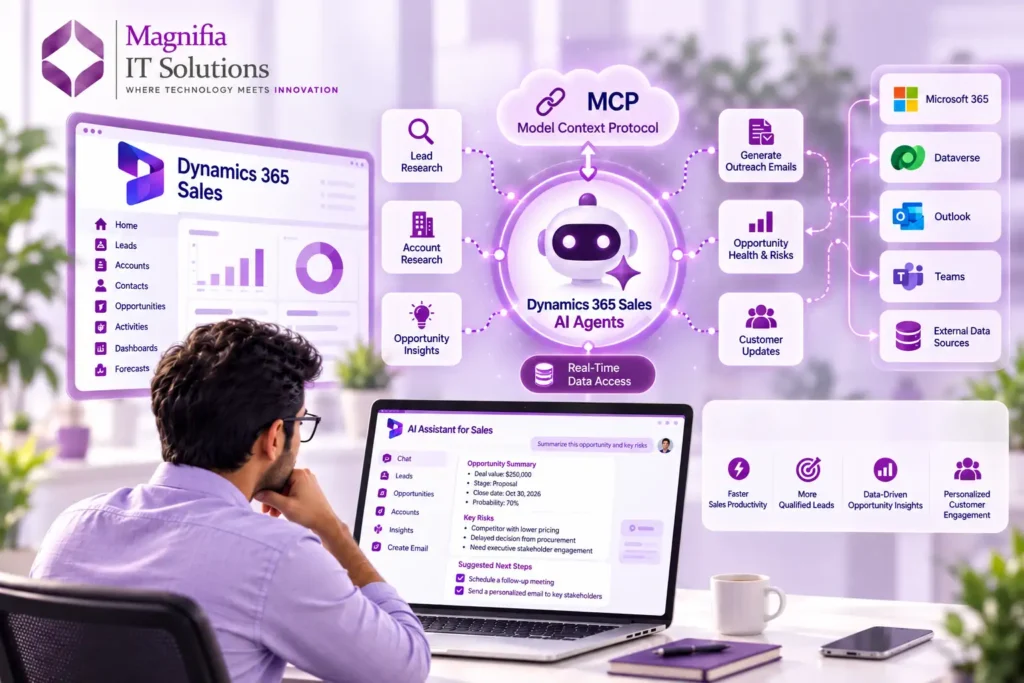
Dynamics 365 Sales now provides an MCP server that allows compatible AI agents and assistants to interact with sales-specific capabilities and Dataverse data. Microsoft describes MCP as a standard that allows AI agents and assistants to interact with applications and services consistently. The Dynamics 365 Sales MCP server provides tools for retrieving sales information, generating insights, drafting emails, and performing sales-related actions.
This development is important for businesses looking to combine CRM automation, artificial intelligence, real-time business information, and personalized sales workflows.
But what exactly does Dynamics 365 MCP do? How does it work with AI agents? And what does it mean for businesses adopting Microsoft Dynamics 365 Sales?
Let’s explore it in detail.
What Is Dynamics 365 Sales?
Microsoft Dynamics 365 Sales is Microsoft’s CRM solution designed to help sales teams manage accounts, contacts, leads, opportunities, customer interactions, and sales processes.
The platform provides capabilities across the sales lifecycle, including lead management, opportunity management, sales insights, customer relationship management, reporting, and AI-powered assistance.
Microsoft’s current Dynamics 365 Sales capabilities also include AI agents that can research leads, analyze opportunities, provide recommendations, and assist sellers with sales activities.
This means Dynamics 365 Sales is evolving from a traditional system of record into a more proactive system of action.
Instead of requiring a salesperson to manually search through CRM records, emails, meetings, and other information, AI-powered capabilities can help gather relevant information and present it in a more actionable form.
What Is Model Context Protocol (MCP)?
Model Context Protocol, commonly called MCP, is a standard that enables AI agents and assistants to interact with external applications, services, tools, and data sources.
The simplest way to understand MCP is to think of it as a connection layer between an AI system and business applications.
For example, an AI agent may need to answer:
Which high-value opportunities changed this week?
Instead of relying only on information already available inside the AI model, an MCP-enabled agent can call an appropriate business tool, retrieve authorized information from the connected system, and use that information to generate a response.
Microsoft’s Dynamics 365 Sales MCP server provides sales-specific tools that AI agents can use to access CRM capabilities.
This creates a more practical architecture for enterprise AI because the agent can work with business systems rather than operating independently from them.
How Dynamics 365 Sales MCP Works
The process can be understood in four stages.
1. The user asks a question
A salesperson can ask an AI assistant a natural-language question such as:
- Which leads were recently updated?
- Summarize this opportunity.
- What are the biggest risks in this deal?
- Research this account.
- Draft an outreach email.
- What changed since my last login?
2. The AI agent determines what information it needs
The AI agent interprets the request and determines which available tool or capability can provide the required information.
For example, an opportunity-risk question may require sales opportunity insights rather than a generic CRM record lookup.
3. MCP connects the agent with Dynamics 365 Sales
The agent can use the Dynamics 365 Sales MCP server to access supported sales tools and capabilities.
Microsoft’s documentation lists tools for lead research, account research, competitor research, outreach emails, customer updates, sales-record summaries, opportunity insights, opportunity health, opportunity risks, stakeholders, and other sales scenarios.
4. The AI returns an actionable response
Instead of simply showing raw CRM fields, the AI can summarize the information and help the salesperson determine what needs attention.
This can reduce the time spent navigating multiple screens and manually collecting information.
What Can Dynamics 365 Sales AI Agents Do?
Microsoft currently provides multiple AI-powered agents and capabilities within Dynamics 365 Sales.
Sales Qualification Agent
The Sales Qualification Agent can autonomously research leads, evaluate their fit, generate outreach emails, and support engagement depending on the configured mode. Microsoft describes research-only and research-and-engage experiences for this agent.
For sales teams handling large numbers of inbound or outbound leads, this can help automate parts of the qualification process.
Sales Opportunity Agent
The Sales Opportunity Agent focuses on opportunities and can identify risks, highlight promising deals, and provide sellers with greater visibility into opportunities.
This is particularly useful when sales managers have dozens or hundreds of active opportunities.
Sales Research Agent
The Sales Research Agent helps users investigate sales questions using natural-language interaction with sales data.
Instead of manually opening multiple records and reports, sellers can use conversational queries to investigate specific business questions.
Recommended Actions Agent
The Recommended Actions Agent provides prioritized actions intended to help sellers focus on important activities associated with their opportunities.
Sales Close Agent
Microsoft also provides a Sales Close Agent designed to support the sales cycle through customer engagement, product recommendations, objection handling, and follow-up activities.
Together, these capabilities demonstrate the broader shift toward agentic CRM automation.
What Does Real-Time CRM Data Mean With MCP?
The phrase real-time CRM data needs some clarification.
MCP does not mean that every piece of Dynamics 365 data is continuously streamed into an AI model.
Instead, an MCP-enabled AI agent can call supported tools when it needs information and retrieve current information available through those tools, subject to permissions, configuration, service availability, and the specific capability being used.
This distinction is important for businesses.
For example, a salesperson could ask an AI agent to retrieve recently updated leads. Microsoft provides an MCP tool that can retrieve recent changes to leads, accounts, and opportunities owned by the user.
That creates a more dynamic experience than relying on a static dataset.
Key Benefits of Dynamics 365 MCP for Sales Teams
Faster access to sales information
Salespeople often spend significant time searching through CRM records, emails, documents, and other systems.
AI agents can help retrieve and summarize relevant information through natural-language requests.
Better sales productivity
Automating repetitive research and information-gathering tasks allows sellers to spend more time on customer conversations and strategic activities.
Microsoft’s 2026 Dynamics 365 Sales roadmap emphasizes AI, Copilot, autonomous agents, research, lead management, opportunity insights, and seller productivity.
More personalized customer engagement
AI agents can use available customer and sales context to assist with personalized outreach.
For example, the Sales MCP capabilities include tools for drafting outreach emails and retrieving customer updates.
Faster opportunity analysis
Sales managers can use AI-assisted capabilities to understand opportunity health, risks, stakeholders, pain points, and other signals.
This can make sales pipeline reviews more data-driven.
Reduced manual CRM navigation
Rather than moving between multiple CRM pages, users can ask questions conversationally and receive synthesized information.
Microsoft’s Sales agent also brings together information from Dynamics 365 and Microsoft 365 applications, including CRM data and productivity information such as emails, meetings, and calendars.
Dynamics 365 MCP and Dataverse
Another important part of the Microsoft ecosystem is Microsoft Dataverse.
The Dynamics 365 Sales MCP server provides sales-specific tools, while Microsoft also supports Dataverse MCP capabilities for working with Dataverse records.
Microsoft explains that the Sales MCP server supports tools for Dynamics 365 Sales scenarios and that Dataverse MCP can provide CRUD operations for Dataverse records.
This opens the door to more sophisticated business automation.
For example, a company could potentially build an agent workflow that:
- Finds a qualified lead.
- Researches the account.
- Summarizes the opportunity.
- Generates personalized outreach.
- Updates appropriate CRM information.
- Connects the process to another business application.
The exact actions available depend on the connected tools, permissions, configuration, and supported capabilities.
How Businesses Can Use Dynamics 365 Sales AI Agents
There are several practical use cases for organizations adopting Dynamics 365 Sales.
Lead qualification
An AI agent can research leads and provide qualification information before a salesperson spends time on the opportunity.
Sales pipeline analysis
Sales managers can ask AI agents to identify opportunities requiring attention and investigate potential risks.
Account research
Before a customer meeting, sellers can request a summary of relevant account information and recent activity.
Customer follow-ups
AI capabilities can help sellers prepare personalized outreach based on available sales context.
Opportunity management
Sales teams can use AI-assisted insights to understand opportunity health, stakeholders, risks, and potential next actions.
Cross-system automation
MCP becomes especially interesting when organizations connect multiple business applications.
Microsoft has described scenarios where MCP servers from different Dynamics 365 applications can participate in broader workflows. For example, a sales workflow could interact with Business Central and Customer Service capabilities as part of a connected business process.
Security and Access Considerations
AI access to CRM data requires careful governance.
An important point in Microsoft’s documentation is that Copilot in Dynamics 365 Sales can only access information from records and files that the signed-in user has permission to access.
Organizations should therefore consider:
- User permissions
- Dataverse security roles
- Environment configuration
- Data governance
- AI agent permissions
- External data sources
- Compliance requirements
- Monitoring and testing
- Human approval for sensitive actions
Businesses should also test AI agents in sandbox or test environments before production deployment. Microsoft specifically documents deploying AI agents through sandbox or test environments before production so their behavior can be validated.
How to Connect AI Agents to Dynamics 365 Sales MCP
Microsoft currently documents integration with Copilot Studio and compatible AI agents or assistants.
For example, administrators can connect the Dynamics 365 Sales MCP server to a Copilot Studio agent. Microsoft also documents using the Sales MCP server with GitHub Copilot through Visual Studio Code.
Typical prerequisites include appropriate Dynamics 365 Sales and Copilot Studio administrative permissions, required Dataverse configuration where applicable, and sufficient Copilot Studio credits for the tools being used.
Organizations should evaluate the exact licensing, regional availability, preview status, and supported capabilities before deploying an MCP-based production solution.
Why MCP Matters for the Future of CRM
Traditional CRM software primarily focused on storing information.
The next generation of CRM is increasingly focused on understanding information and taking action.
MCP can help provide a standardized mechanism through which AI agents interact with business applications.
This could change how employees use enterprise software.
Instead of asking:
“Which CRM screen should I open?”
Users increasingly ask:
“Which opportunities need my attention today?”
The AI agent can then use available business tools to retrieve information, analyze context, and help the user act.
This is one reason Microsoft is positioning Dynamics 365 Sales around AI agents, Copilot, automation, and a unified data platform.
Is Dynamics 365 Sales MCP Right for Your Business?
For organizations already using Microsoft Dynamics 365 Sales, MCP can be an important technology to evaluate when building AI-powered sales workflows.
It can be particularly relevant for businesses that want to:
- Automate sales research
- Improve lead qualification
- Analyze opportunities faster
- Build custom AI agents
- Connect CRM information with other business systems
- Reduce repetitive sales administration
- Create natural-language interfaces for business data
- Extend Dynamics 365 with Copilot Studio
However, successful implementation requires more than simply connecting an AI agent.
Organizations should first identify specific business processes, determine which data the agent needs, establish permissions, select appropriate tools, test responses, and define human approval requirements.
Dynamics 365 Sales AI Agents and MCP: The 2026 Outlook
The combination of Dynamics 365 Sales, AI agents, Copilot, Dataverse, and MCP represents an important development in Microsoft’s CRM strategy.
AI agents can now work with supported sales capabilities instead of operating separately from CRM systems. Microsoft’s current Sales MCP documentation includes tools for research, sales insights, summaries, outreach, opportunity analysis, and other sales activities.
For businesses, the opportunity is not simply about having an AI chatbot.
The bigger opportunity is building AI-powered sales workflows that can understand business context, access authorized data, and help employees take meaningful actions.
As AI agents become more capable, companies will need to think carefully about data quality, security, governance, integrations, and human oversight.
For organizations considering Dynamics 365 implementation or modernization, Dynamics 365 Sales MCP is therefore worth evaluating as part of a broader AI and CRM strategy.
Frequently Asked Questions
What is Dynamics 365 Sales MCP?
Dynamics 365 Sales MCP is Microsoft’s Model Context Protocol server for Dynamics 365 Sales. It enables compatible AI agents and assistants to use supported sales tools and access relevant Dynamics 365 Sales capabilities.
Can AI agents access Dynamics 365 Sales data?
Yes. Microsoft’s supported MCP capabilities allow compatible AI agents to retrieve information and use supported Dynamics 365 Sales tools, subject to permissions and configuration.
What can Dynamics 365 Sales AI agents do?
Depending on the agent and configuration, capabilities include lead research, lead qualification, opportunity analysis, customer updates, sales summaries, outreach email drafting, and opportunity insights.
Is Dynamics 365 MCP the same as Copilot?
No. MCP is a protocol and connection mechanism, while Copilot is Microsoft’s AI experience. Dynamics 365 Sales can expose supported capabilities through its MCP server so compatible agents can interact with them.
Can Dynamics 365 MCP work with Copilot Studio?
Yes. Microsoft documents connecting the Dynamics 365 Sales MCP server to agents built with Copilot Studio.
Does MCP automatically give an AI access to all CRM data?
No. Access depends on supported tools, permissions, configuration, connected systems, and the specific agent experience. Organizations should implement appropriate security and governance controls.
Final Thoughts
Dynamics 365 Sales AI agents and MCP are helping move CRM from a place where sales data is stored toward a platform where AI can actively work with that data.
With supported MCP capabilities, AI agents can retrieve sales information, research leads and accounts, analyze opportunities, generate sales insights, and assist with customer engagement.
For companies already using Microsoft Dynamics 365, this creates new possibilities for CRM automation, AI-powered sales, intelligent lead management, opportunity management, and connected business workflows.
The key is to start with measurable business processes rather than simply adding AI for the sake of AI. When implemented with strong data governance, security, testing, and human oversight, Dynamics 365 Sales AI agents can become a practical part of a modern sales technology strategy.
Magnifia IT Solutions can help businesses evaluate their Dynamics 365 environment, identify suitable AI and automation opportunities, design integrations, and build solutions around Microsoft technologies such as Dynamics 365, Power Platform, Dataverse, Copilot Studio, and AI agents.