
Moving from one CRM platform to another has traditionally been a complex technology project. Businesses need to understand their existing CRM configuration, identify dependencies, map data, rebuild processes, test integrations, and ensure that users can continue working without major disruption.
Microsoft is now addressing part of this challenge with Dynamics 365 Activate, a new AI-assisted implementation and migration experience designed to help organizations move to Dynamics 365 with less manual effort.
As of September 2026, Dynamics 365 Activate is available as a public preview, with Salesforce as its first supported migration scenario. Microsoft says the tool is designed to analyze an existing Salesforce environment, provide migration recommendations, help generate mappings and configurations, migrate data, and support reconciliation.
For companies evaluating a Salesforce to Dynamics 365 migration, this development is particularly relevant because it brings more automation into what has traditionally required significant discovery and implementation work.
What Is Dynamics 365 Activate?
Dynamics 365 Activate is a web-based Microsoft application that helps customers, partners, and systems integrators assess existing business application environments and accelerate Dynamics 365 implementation and migration projects.
The current preview focuses on migrating from Salesforce to Dynamics 365 Sales and Dynamics 365 Customer Service. It can analyze elements of a Salesforce organization including objects, fields, relationships, automation, custom code, integrations, layouts, packages, localization settings, and data volumes.
Instead of treating migration as a simple data-transfer exercise, Dynamics 365 Activate follows a broader approach:
- Assess the existing Salesforce environment
- Understand the business and technical dependencies
- Plan what should move, change, simplify, or be excluded
- Map Salesforce objects and fields to Dataverse
- Deploy the required Dynamics 365 schema
- Migrate selected data
- Reconcile and verify migration results
This approach is important because a successful CRM migration is not simply about moving records from one database to another.
Why Salesforce to Dynamics 365 Migration Is Complex
A Salesforce environment can contain years of accumulated business processes, custom fields, automation, integrations, reports, security configurations, and historical data.
For example, an organization may have:
- Accounts and contacts
- Leads and opportunities
- Cases and customer service records
- Custom objects
- Custom fields
- Salesforce Flows
- Apex classes and triggers
- Lightning pages
- Third-party packages
- External integrations
- User and security configurations
- Historical customer data
Simply recreating everything in Dynamics 365 may result in unnecessary complexity.
Microsoft’s documentation specifically describes Dynamics 365 Activate as helping teams determine what should be preserved, simplified, redesigned, or excluded instead of automatically recreating the existing Salesforce environment.
That makes the assessment and planning stage one of the most important parts of a Salesforce CRM migration.
How Dynamics 365 Activate Works
1. Salesforce Discovery and Assessment
The first stage is understanding the source Salesforce environment.
Dynamics 365 Activate can perform discovery against a Salesforce organization and analyze metadata and aggregate information. Microsoft documents discovery of objects, fields, relationships, automation, custom code, Lightning pages, installed packages, integrations, localization settings, licenses, record counts, and other environment information.
The discovery process is designed to be read-only on Salesforce.
According to Microsoft’s documentation, discovery does not create, update, or delete Salesforce records or configurations. It reads information needed to create a migration assessment.
This can give migration teams a clearer picture of the existing CRM before making architectural decisions.
2. Analyze the Existing Salesforce Environment
After discovery, teams can review the source environment and identify migration scope and dependencies.
This is where AI-assisted analysis can become valuable.
Instead of manually reviewing every configuration element, organizations can use the information collected by Dynamics 365 Activate to understand the environment and identify areas requiring attention.
The goal is not simply:
Salesforce → Dynamics 365
It is:
Salesforce → Assessment → Transformation → Dynamics 365
That distinction can help organizations avoid carrying unnecessary legacy complexity into their new CRM platform.
3. Connect the Dynamics 365 Environment
The next stage involves connecting the target Dynamics 365 environment.
Dynamics 365 Activate uses Microsoft Entra application registration and a Dataverse application user for the Dynamics 365 connection. Microsoft documents OAuth-based authentication and recommends assigning only the permissions required for the migration workload.
The target environment is important because Dynamics 365 solutions are built on Microsoft Dataverse.
The migration team therefore needs to understand:
- Target environment
- Dataverse tables
- Columns
- Relationships
- Choices
- Existing solutions
- Security requirements
- Application configuration
- Data volumes
This target discovery provides the information needed for effective mapping.
4. Salesforce-to-Dataverse Data Mapping
Data mapping is one of the most critical stages in any CRM migration.
Salesforce objects and fields do not always correspond directly to Dynamics 365 tables and columns.
For example:
| Salesforce | Dynamics 365 / Dataverse |
|---|---|
| Account | Account |
| Contact | Contact |
| Lead | Lead |
| Opportunity | Opportunity |
| Case | Case |
| Activity | Activity |
| Custom Object | Custom/standard Dataverse table depending on requirements |
Dynamics 365 Activate provides a mapping workbench where Salesforce objects and fields can be mapped to Dynamics 365 tables and columns. Microsoft also provides standard mappings for common Sales and Customer Service data.
Organizations can review and adjust generated mappings rather than blindly accepting automated results.
This is important because business requirements vary significantly between organizations.
A custom Salesforce field called Customer Tier, for example, may need to become a Dataverse choice column. Another field may need transformation, consolidation, or may no longer be required.
5. Schema Creation and Deployment
Once mappings have been reviewed, the migration process can use those mappings to create or configure the required Dynamics 365 schema.
The schema can include:
- Tables
- Columns
- Choice values
- Relationships
- Required solution components
This creates the foundation required for the migration.
Organizations should still validate the resulting design against their business requirements before moving production data.
Automation can accelerate implementation, but it does not eliminate the need for solution architecture and business validation.
6. Data Migration
After discovery and mapping, organizations can begin migrating selected Salesforce data into Dynamics 365.
Microsoft currently documents three migration modes:
Trial 100: Migrates up to 100 records from a table to validate mappings and transformations.
Full migration: Processes all records within the defined scope.
Delta migration: Processes Salesforce records that changed after the previous successful migration.
This staged approach can be useful for organizations that want to test their migration before moving the complete dataset.
For example, a project team could:
- Migrate 100 accounts.
- Validate relationships.
- Check fields and values.
- Review business processes.
- Fix mapping issues.
- Perform a larger migration.
- Run the final migration after validation.
This is generally more controlled than immediately attempting a full production migration.
7. Migration Verification and Reconciliation
Data migration is not complete when records appear in the target CRM.
Organizations need to verify that the migrated data is accurate.
Dynamics 365 Activate provides reconciliation capabilities that compare Salesforce and Dataverse record counts. Microsoft also documents dashboard verification and configurable record sampling with field-level comparisons.
Important validation areas include:
- Record counts
- Required fields
- Relationships
- Lookup values
- Choice mappings
- User ownership
- Created and modified information
- Customer records
- Opportunities
- Cases
- Activities
- Custom data
- Business processes
Microsoft recommends performing migration in a non-production Dynamics 365 environment first and validating results before moving to production.
What Makes Dynamics 365 Activate Different?
Traditional CRM migration projects can involve substantial manual discovery.
Consultants and technical teams may need to document:
- Existing Salesforce objects
- Field structures
- Customizations
- Automations
- Integrations
- Dependencies
- Data quality
- Business processes
- Migration requirements
Dynamics 365 Activate is designed to bring more of this work into a unified migration experience.
Microsoft says the technology is informed by hundreds of recent Dynamics 365 migrations and is intended to help partners and customers move from requirements toward implementation with greater automation.
The larger concept is an AI-assisted CRM migration workflow rather than a conventional migration utility.
Benefits of Dynamics 365 Activate
Faster Migration Discovery
Automated discovery can reduce the amount of manual work required to understand a Salesforce organization.
Better Migration Planning
Organizations can evaluate their existing environment before deciding what should be migrated.
Automated Mapping Assistance
Generated object and field mappings can provide a starting point for migration teams.
Controlled Data Migration
Trial, full, and delta migration modes provide different approaches for moving data.
Improved Validation
Reconciliation and sampling capabilities can help identify discrepancies after migration.
Reduced Manual Effort
Automation can reduce repetitive technical tasks, allowing implementation teams to focus more on architecture, business requirements, testing, and adoption.
Is Dynamics 365 Activate a Fully Automatic Salesforce Migration Tool?
No.
This is an important distinction.
Dynamics 365 Activate can automate and assist with significant parts of the migration process, but organizations should not treat it as a one-click Salesforce replacement.
Business decisions are still required.
For example, a company needs to decide:
- Which Salesforce customizations should remain?
- Which processes should be redesigned?
- Which data is still relevant?
- Which integrations need replacement?
- Which historical records need migration?
- How should security be structured?
- How should users work in the new environment?
- Which business processes should be improved rather than copied?
Microsoft itself describes the approach as helping teams decide what to preserve, simplify, redesign, or exclude.
The technology can accelerate migration work, but experienced Dynamics 365 implementation partners remain important for solution architecture, business process design, customization, testing, training, and deployment.
Dynamics 365 Activate Security and Data Handling
Security is particularly important when migrating CRM data.
Microsoft documents that Dynamics 365 Activate uses controlled connections and encryption for stored connection credentials. For Salesforce discovery, the application uses Salesforce APIs and applies read-only behavior during discovery.
Microsoft also states that credentials are encrypted using AES-256-GCM, with Microsoft-managed key encryption in Azure Key Vault for hosted environments.
Organizations should nevertheless perform their own security review before beginning a migration.
Least-privilege access should be used wherever possible, and migration credentials should be managed securely.
Current Limitations in 2026
Because Dynamics 365 Activate is currently a preview feature, organizations should carefully review its current capabilities before using it for a production migration.
Microsoft’s documentation states that preview features may have restricted functionality and can change before official release.
At the current stage, Salesforce is the primary supported migration scenario, with Dynamics 365 Sales and Customer Service as supported destinations. Microsoft has indicated that additional CRM and ERP migration scenarios are planned.
Therefore, businesses should evaluate:
- Supported Salesforce configurations
- Data volume
- Custom objects
- Apex and automation requirements
- Third-party integrations
- Security requirements
- Regional availability
- Target Dynamics 365 architecture
- Production readiness
- Testing requirements
Who Should Consider Dynamics 365 Activate?
Dynamics 365 Activate may be particularly relevant for organizations that are evaluating a move from Salesforce to Microsoft’s business application ecosystem.
Potential use cases include:
Growing businesses that want an integrated Microsoft business platform.
Organizations already using Microsoft 365 that want closer integration between CRM, productivity, collaboration, analytics, and business applications.
Companies modernizing legacy CRM environments that want to evaluate existing customizations before migration.
Enterprises planning CRM transformation where understanding dependencies and data structures is a major part of the migration project.
Microsoft partners and system integrators looking for tools that can accelerate Salesforce assessment and migration activities.
How Businesses Should Prepare for a Salesforce to Dynamics 365 Migration
Even with AI-assisted migration, preparation remains essential.
Start by defining the business objectives.
Next, audit the existing Salesforce environment and identify the data and processes that are genuinely required.
Then create a migration strategy covering:
- Business requirements
- Salesforce discovery
- Data quality assessment
- Target Dynamics 365 architecture
- Object and field mapping
- Integration planning
- Security design
- Customization requirements
- Data migration
- Testing
- User training
- Production deployment
- Post-migration support
This approach helps ensure that technology supports the business rather than simply reproducing the old system.
Dynamics 365 Activate vs Traditional Salesforce Migration
The biggest difference is the level of automation and AI assistance.
A traditional Salesforce-to-Dynamics 365 migration may require extensive manual discovery, spreadsheets, mapping documentation, custom scripts, ETL tools, testing frameworks, and multiple technical workstreams.
Dynamics 365 Activate brings assessment, mapping, migration, and reconciliation into a Microsoft-hosted experience designed specifically around Dynamics 365 migration.
However, these approaches are not necessarily mutually exclusive.
Complex organizations may still require additional tools, custom integration work, transformation logic, development, and specialist implementation services.
The Future of AI-Powered Dynamics 365 Migration
Microsoft’s announcement suggests that Dynamics 365 Activate is intended to become broader than its initial Salesforce migration scenario.
Microsoft has described future capabilities around areas such as agentic mapping and test sampling, natural-language migration guidance, and executive assessment summaries. Additional CRM and ERP migration scenarios are also planned.
This points toward a broader shift in enterprise software implementation.
Instead of manually documenting every system component and designing every migration step from scratch, AI-assisted platforms can increasingly help teams understand existing environments, recommend transformation approaches, generate configurations, and validate outcomes.
The human role remains important, particularly for business decisions, architecture, governance, security, and change management.
Final Thoughts
Dynamics 365 Activate represents an important development in Salesforce to Dynamics 365 migration.
Its current preview combines AI-assisted assessment, environment discovery, object and field mapping, schema deployment, data migration, and reconciliation into a unified migration experience.
For organizations considering a Salesforce CRM migration, the most important takeaway is that Dynamics 365 Activate is not simply a data-import utility. It is designed to help teams understand the existing Salesforce environment and make more informed decisions about how that environment should be transformed for Dynamics 365.
As of 2026, businesses should evaluate the tool within the limitations of its preview status and use proper testing, security controls, data validation, and implementation planning before production deployment.
For organizations planning a Salesforce to Dynamics 365 migration, this is a technology worth evaluating alongside their broader CRM transformation strategy.
Magnifia IT Solutions can help businesses assess their CRM requirements, plan Dynamics 365 implementations, design migration strategies, configure Dynamics 365, integrate business systems, and support organizations through deployment and optimization.
Frequently Asked Questions
What is Dynamics 365 Activate?
Dynamics 365 Activate is Microsoft’s AI-assisted implementation and migration application for Dynamics 365. As of September 2026, its public preview supports Salesforce-to-Dynamics 365 migration scenarios.
Can Dynamics 365 Activate migrate Salesforce data?
Yes. The current preview supports migration of selected Salesforce data to Dynamics 365 Sales and Dynamics 365 Customer Service, including mapping, schema deployment, migration, and reconciliation capabilities.
Is Dynamics 365 Activate free?
Microsoft’s current documentation describes Dynamics 365 Activate as a preview service, but organizations should check Microsoft’s current access, preview, licensing, and usage terms for their specific scenario rather than assuming that all migration activity is free.
Does Dynamics 365 Activate migrate Salesforce customizations?
It can analyze Salesforce customizations including objects, fields, automation, Apex classes, Lightning pages, packages, and integrations during discovery. The appropriate migration approach still depends on the specific customization and target Dynamics 365 design.
Is Dynamics 365 Activate ready for production?
As of September 2026, Microsoft’s documentation identifies Dynamics 365 Activate as a preview feature. Preview functionality can have restrictions and may change, so organizations should evaluate current capabilities and thoroughly test their migration before production deployment.
What is the best approach for Salesforce to Dynamics 365 migration?
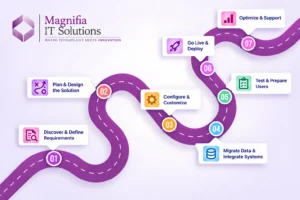
A structured approach is recommended: assess Salesforce, define the target architecture, clean and map data, configure Dynamics 365, perform trial migration, test business processes, validate migrated data, train users, and then plan production deployment.