
Businesses today need more than individual software applications to manage sales, finance, customers, employees, supply chains, and daily operations. As organizations grow, disconnected systems can create data silos, manual processes, duplicate information, and limited visibility.
Microsoft Dynamics 365 addresses these challenges through a portfolio of cloud-based CRM and ERP applications that organizations can use individually or together. Microsoft describes Dynamics 365 as a collection of AI-powered business applications covering areas such as sales, service, finance, supply chain, and other business functions.
But with multiple applications available, one of the most common questions businesses have is:
Which Dynamics 365 modules does my business actually need?
This complete guide explains the major Dynamics 365 modules and applications in 2026, what each one does, which business functions it supports, and how organizations can combine them to create a connected business environment.
What Is Microsoft Dynamics 365?
Microsoft Dynamics 365 is a suite of business applications designed to help organizations manage customer relationships, financial operations, supply chains, employees, projects, commerce, and other business processes.
Rather than requiring every organization to purchase one large system, Dynamics 365 allows businesses to select the applications that match their requirements and connect them as their needs evolve.
Microsoft categorizes Dynamics 365 across CRM and ERP capabilities. Current applications include Sales, Customer Service, Contact Center, Field Service, Finance, Supply Chain Management, Project Operations, Human Resources, Commerce, Customer Insights, and Business Central.
This modular approach makes Dynamics 365 relevant to organizations ranging from small and midsize businesses to larger enterprises.
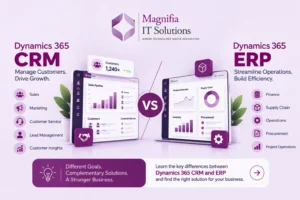
Dynamics 365 CRM vs ERP Modules
Before looking at individual applications, it is useful to understand the difference between CRM and ERP.
Dynamics 365 CRM Applications
CRM applications primarily focus on customers, sales, marketing, customer service, and customer engagement.
Major CRM applications include:
- Dynamics 365 Sales
- Dynamics 365 Customer Service
- Dynamics 365 Contact Center
- Dynamics 365 Field Service
- Dynamics 365 Customer Insights
Dynamics 365 ERP Applications
ERP applications focus more heavily on finance, operations, supply chain, manufacturing, projects, commerce, and organizational processes.
Major ERP applications include:
- Dynamics 365 Business Central
- Dynamics 365 Finance
- Dynamics 365 Supply Chain Management
- Dynamics 365 Project Operations
- Dynamics 365 Human Resources
- Dynamics 365 Commerce
The important point is that Dynamics 365 is not simply one CRM or one ERP product. It is an ecosystem of applications that can work independently or together.
Complete Dynamics 365 Modules List
1. Dynamics 365 Sales
Dynamics 365 Sales is Microsoft’s CRM application for sales organizations.
It helps sales teams manage prospects, leads, opportunities, accounts, contacts, activities, pipelines, and customer relationships.
Key capabilities include:
- Lead management
- Opportunity management
- Account and contact management
- Sales forecasting
- Pipeline management
- Activity management
- Sales dashboards
- AI-powered insights
- Microsoft 365 integration
- Sales automation
Microsoft’s current Sales offering includes AI and agentic capabilities designed to help sellers manage opportunities, access contextual insights, and improve sales productivity.
Best suited for:
Businesses that need structured sales processes, pipeline visibility, customer information, and sales automation.
2. Dynamics 365 Customer Service
Dynamics 365 Customer Service helps organizations manage customer support and service operations.
It can help service teams organize customer cases, interactions, knowledge, service processes, and support workflows.
Key capabilities include:
- Case management
- Customer support
- Knowledge management
- Omnichannel service
- Service analytics
- Automation
- AI-assisted service
- Customer interaction history
Microsoft positions Customer Service around resolving customer issues with generative AI and automation.
Best suited for:
Organizations with dedicated customer support teams or high volumes of customer service interactions.
3. Dynamics 365 Contact Center
Dynamics 365 Contact Center is designed for organizations managing customer interactions across multiple communication channels.
It supports digital and voice-based customer engagement and is designed to bring customer service interactions together in a connected environment.
Best suited for:
Businesses with contact centers, large customer support operations, or complex omnichannel customer engagement requirements.
Microsoft currently includes Contact Center among the core Dynamics 365 applications and describes it as an all-in-one solution for digital and voice customer engagement.
4. Dynamics 365 Field Service
Dynamics 365 Field Service is designed for organizations that provide services at customer locations.
It can help organizations manage technicians, work orders, scheduling, assets, inspections, and field operations.
Key areas include:
- Work order management
- Resource scheduling
- Technician management
- Customer assets
- Mobile field operations
- Service history
- Scheduling optimization
- Field service analytics
Best suited for:
Manufacturing service teams, equipment maintenance companies, utilities, facilities management, and organizations with mobile technicians.
5. Dynamics 365 Customer Insights
Customer Insights focuses on bringing customer information together and supporting personalized customer experiences.
It includes capabilities around customer data and customer journeys.
Organizations can use customer insights to understand customer behavior and create more personalized engagement strategies.
Best suited for:
Businesses that want to unify customer information, improve customer journeys, and create more targeted engagement.
Microsoft currently describes Customer Insights as bringing customer data together with real-time journeys and Copilot capabilities.
6. Dynamics 365 Business Central
Dynamics 365 Business Central is Microsoft’s ERP solution designed specifically for small and midsize businesses.
It connects areas such as:
- Finance
- Sales
- Purchasing
- Inventory
- Supply chain
- Warehouse management
- Projects
- Service
- Manufacturing
Business Central is particularly relevant for SMBs that have outgrown basic accounting software, spreadsheets, or disconnected business applications.
Microsoft currently describes Business Central as an AI-powered ERP for small and midsize businesses, with capabilities spanning finance, supply chain, manufacturing, projects, service operations, and more.
Best suited for:
Small and midsize businesses looking for an integrated ERP platform.
Business Central Pricing in India
Microsoft’s current India pricing page lists:
- Business Central Essentials: ₹6,655/user/month, paid yearly
- Business Central Premium: ₹9,150/user/month, paid yearly
- Team Members: ₹665/user/month, paid yearly
GST is extra as applicable.
Pricing can change, so businesses should verify current Microsoft pricing before making licensing decisions.
7. Dynamics 365 Finance
Dynamics 365 Finance is an enterprise financial management application designed to help organizations manage complex financial operations.
Key capabilities include:
- General ledger
- Accounts payable
- Accounts receivable
- Budgeting
- Financial reporting
- Cash management
- Fixed assets
- Financial planning
- Global financial operations
- AI-assisted finance processes
Microsoft currently lists Dynamics 365 Finance at ₹17,470/user/month in India for the standard plan and ₹24,960/user/month for Finance Premium, both paid yearly, with GST extra.
Best suited for:
Organizations with complex financial processes, multiple entities, advanced financial requirements, or larger-scale operations.
8. Dynamics 365 Supply Chain Management
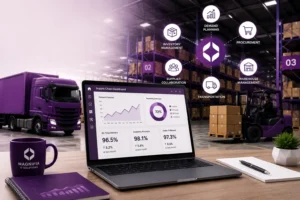
Dynamics 365 Supply Chain Management is designed for organizations managing complex supply chain and operational processes.
It can support:
- Procurement
- Inventory management
- Warehouse management
- Product information
- Demand planning
- Supply planning
- Production
- Asset-related processes
- Order fulfillment
- Transportation processes
Microsoft’s current documentation highlights inventory, order processing, demand forecasting, purchasing, supply planning, and warehouse capabilities within its supply-chain functionality.
Best suited for:
Manufacturers, distributors, retailers, wholesalers, and organizations with complex supply chain operations.
9. Dynamics 365 Project Operations
Dynamics 365 Project Operations is designed to help organizations manage project-based work.
It connects project sales, planning, resources, expenses, time, billing, and financial information.
Key areas include:
- Project planning
- Resource management
- Project estimates
- Time tracking
- Expense management
- Project billing
- Project profitability
- Project reporting
Best suited for:
Consulting firms, professional services organizations, engineering companies, IT services businesses, and project-based organizations.
10. Dynamics 365 Human Resources
Dynamics 365 Human Resources helps organizations manage employee-related processes.
Capabilities can include:
- Employee information
- Benefits
- Leave and absence
- Workforce management
- Personnel processes
- HR analytics
- Employee self-service
Best suited for:
Organizations looking to centralize HR information and improve workforce management.
11. Dynamics 365 Commerce
Dynamics 365 Commerce is designed for retailers and organizations managing commerce operations across physical and digital channels.
It can support:
- Retail stores
- Ecommerce
- Product management
- Pricing
- Promotions
- Customer engagement
- Order management
- Point of sale
- Inventory
Best suited for:
Retailers, ecommerce businesses, and organizations operating multiple sales channels.
How Do Dynamics 365 Modules Work Together?
One of the biggest advantages of the Dynamics 365 ecosystem is the ability to connect applications.
For example, a manufacturing company could use:
Dynamics 365 Sales
→ Manage customers and opportunities
Dynamics 365 Finance
→ Manage financial transactions
Dynamics 365 Supply Chain Management
→ Manage purchasing, inventory, and supply chain
Dynamics 365 Customer Service
→ Manage customer support
Power BI
→ Analyze business performance
This creates a connected flow of information between departments instead of requiring every team to maintain separate databases.
Microsoft describes Dynamics 365 as a set of applications that can be used individually or together to connect teams, processes, and data.
Which Dynamics 365 Module Does Your Business Need?
The answer depends on your business model and requirements.
| Business requirement | Potential Dynamics 365 application |
|---|---|
| Sales pipeline | Dynamics 365 Sales |
| Customer support | Dynamics 365 Customer Service |
| Contact center | Dynamics 365 Contact Center |
| Field technicians | Dynamics 365 Field Service |
| Customer journeys | Dynamics 365 Customer Insights |
| SMB ERP | Dynamics 365 Business Central |
| Enterprise finance | Dynamics 365 Finance |
| Supply chain | Dynamics 365 Supply Chain Management |
| Project-based business | Dynamics 365 Project Operations |
| HR management | Dynamics 365 Human Resources |
| Retail and ecommerce | Dynamics 365 Commerce |
This table should be treated as a starting point rather than a licensing recommendation. Actual application selection should be based on business processes, users, integrations, geographic requirements, data, and future plans.
Dynamics 365 Modules and AI in 2026
AI is becoming an increasingly important part of Dynamics 365.
Microsoft’s 2026 release wave includes investments across Sales, Customer Service, Contact Center, Field Service, Finance, Supply Chain Management, Project Operations, Human Resources, Commerce, Customer Insights, and Business Central.
Microsoft is also moving toward AI agents and more autonomous business processes.
For example, Business Central’s current capabilities include AI-powered features and agents that can support business processes.
This means businesses evaluating Dynamics 365 in 2026 should consider not only current functionality but also how AI, automation, analytics, and integrations fit into their longer-term technology strategy.
Dynamics 365 Implementation Considerations
Choosing the right Dynamics 365 module is only the first step.
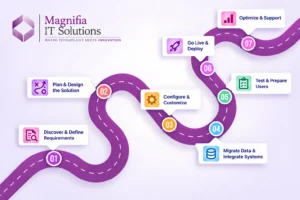
A successful implementation generally requires:
- Business requirements analysis
- Process mapping
- Solution design
- Application configuration
- Customization where necessary
- Data migration
- Integrations
- Security configuration
- Testing
- User training
- Go-live planning
- Post-go-live support
Businesses should avoid selecting applications based solely on feature lists.
The implementation should begin with the business processes that need to be improved and then determine which Dynamics 365 applications and capabilities best support those processes.
Microsoft provides implementation guidance through its Dynamics 365 documentation and Success by Design resources.
Why Choose a Dynamics 365 Consulting Partner?
A Dynamics 365 consulting partner can help organizations translate business requirements into a practical solution architecture.
Depending on the project, a partner may support:
- Dynamics 365 consulting
- ERP implementation
- CRM implementation
- Business Central implementation
- Data migration
- System integration
- Customization and development
- Testing
- User training
- Upgrades
- Managed services
- Support and maintenance
For complex implementations, experienced guidance can also help businesses reduce unnecessary customization and create a more maintainable solution.
Final Thoughts
Dynamics 365 modules provide organizations with a flexible portfolio of CRM and ERP applications covering sales, customer service, field operations, finance, supply chain, projects, HR, commerce, customer insights, and SMB business management.
The key is not to select every available application.
Instead, businesses should identify their most important processes, understand their current challenges, determine which applications address those requirements, and create an implementation roadmap that can evolve as the organization grows.
For a small or midsize business, Dynamics 365 Business Central may provide a strong foundation for finance and operations. Larger or more complex organizations may need applications such as Dynamics 365 Finance, Supply Chain Management, Sales, Customer Service, Project Operations, or Commerce.
The modular nature of Dynamics 365 allows organizations to start with the applications they need and expand their technology environment as business requirements evolve.
Looking to select, implement, integrate, or optimize Microsoft Dynamics 365? Magnifia IT Solutions can help you evaluate your business requirements and create a practical Dynamics 365 roadmap.
Frequently Asked Questions
What are the main Dynamics 365 modules?
Major Dynamics 365 applications include Sales, Customer Service, Contact Center, Field Service, Customer Insights, Business Central, Finance, Supply Chain Management, Project Operations, Human Resources, and Commerce.
Is Dynamics 365 an ERP or CRM?
Dynamics 365 includes both CRM and ERP applications. CRM applications focus on areas such as sales and customer service, while ERP applications support finance, supply chain, operations, HR, projects, and other business processes.
What is the best Dynamics 365 module for small businesses?
For many small and midsize businesses looking for an ERP platform, Business Central is specifically designed for SMB requirements. However, the appropriate application depends on the organization’s business processes and requirements.
What is the difference between Dynamics 365 Business Central and Finance?
Business Central is designed primarily for small and midsize organizations, while Dynamics 365 Finance is an enterprise financial management application designed for more complex financial operations.
Can Dynamics 365 modules be integrated?
Yes. Microsoft designs Dynamics 365 applications to work individually or together, allowing organizations to connect teams, processes, and data.
How much does Dynamics 365 cost?
There is no single Dynamics 365 price because each application has its own licensing model and plans. Microsoft provides separate pricing for applications such as Sales, Finance, Supply Chain Management, and Business Central.
Does Dynamics 365 include AI?
Microsoft is adding AI, Copilot, automation, and agent capabilities across Dynamics 365 applications. Availability varies by application, plan, region, and licensing requirements.
How do I choose the right Dynamics 365 solution?
Start by documenting your business processes, users, current systems, pain points, integrations, reporting requirements, and growth plans. Then map those requirements to the appropriate Dynamics 365 applications before deciding on licensing and implementation.