Microsoft Copilot usage-based billing is becoming an increasingly important consideration for organizations adopting AI across Microsoft 365 and Dynamics 365. Instead of relying only on fixed licensing, Microsoft is expanding usage-based models where eligible AI experiences consume Copilot Credits based on actual usage.
For IT administrators, this creates a new responsibility: understanding how Copilot Credits work, connecting the right billing method, setting spending limits, configuring alerts, and monitoring consumption before AI usage turns into unexpected costs.
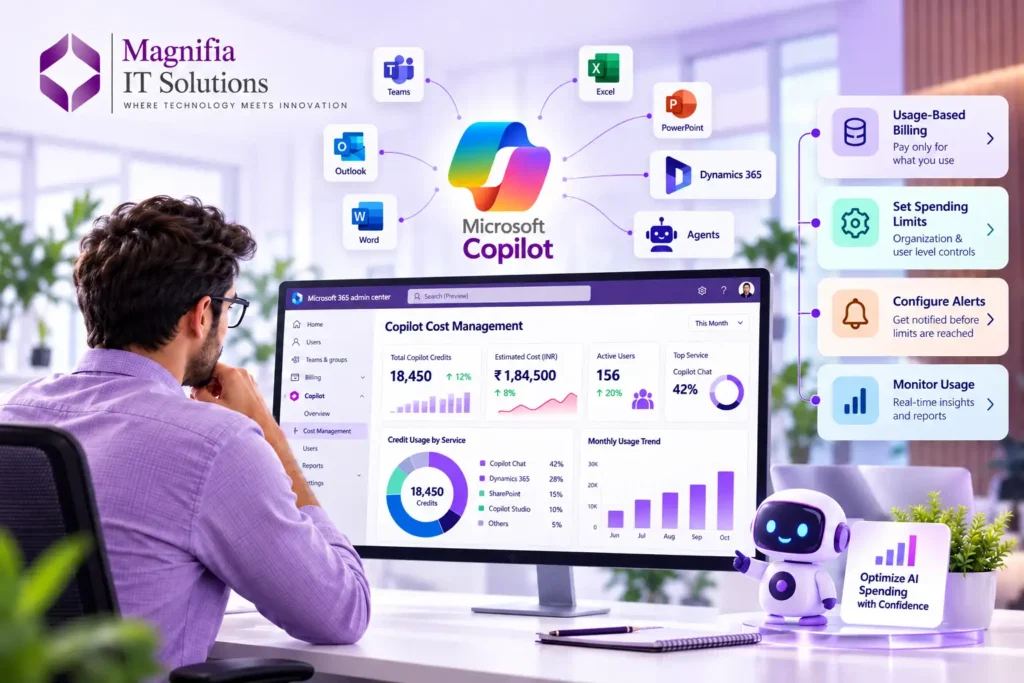
Microsoft provides a centralized Cost Management experience in the Microsoft 365 admin center for configuring billing, spending policies, limits, alerts, and consumption monitoring.
This guide explains what Microsoft Copilot usage-based billing means, what administrators need to configure, and how businesses can control AI spending while continuing to take advantage of Copilot and AI-powered experiences.
What Is Microsoft Copilot Usage-Based Billing?
Traditional software licensing generally charges organizations based on the number of users, licenses, or subscriptions assigned.
Usage-based billing works differently.
With Microsoft’s usage-based billing model, organizations are charged according to the amount of eligible AI work performed. Microsoft measures this consumption using Copilot Credits, which act as a common unit for eligible Microsoft AI experiences.
Depending on the service, organizations can use different billing approaches, including fixed licensing, Copilot Credit Pre-Purchase Plans, pay-as-you-go billing, and supported prepaid capacity options.
The exact billing and licensing experience depends on the Microsoft service being used.
For administrators, the important point is that AI consumption now needs to be treated as both a technology and cost-management consideration.
A strong Copilot strategy should combine:
AI adoption + usage visibility + spending controls + security + governance
What Are Copilot Credits?
Copilot Credits are Microsoft’s common measurement unit for eligible usage-based AI experiences.
The number of credits consumed can depend on the work being performed. Factors such as the AI model being used, context retrieved, processing required, and tools involved can affect consumption.
This means two users may not necessarily consume the same amount of AI capacity.
For example, a simple AI request may require relatively little processing, while a more complex task involving multiple steps, reasoning, data retrieval, or tools may consume more resources.
This is why organizations should not simply enable AI capabilities without establishing appropriate governance.
Copilot Credits give administrators a way to understand AI consumption and connect that consumption with financial planning.
Which Microsoft Copilot Experiences Use Usage-Based Billing?
Microsoft is continuing to expand usage-based billing to additional AI experiences.
The Microsoft 365 admin center provides administrators with visibility and controls for supported usage-based Copilot experiences. Microsoft documentation currently identifies experiences such as Copilot Cowork, apps built with Copilot Cowork, and Work IQ API, with additional services potentially being added over time.
It is important to understand that not every Microsoft Copilot feature uses exactly the same billing model.
Microsoft has separate licensing and administration models for different Copilot products, agents, and services.
Similarly, selected Copilot and agent capabilities in Dynamics 365 use consumption-based billing and Copilot Credits.
Therefore, administrators should always verify the billing model for the specific Microsoft service and capability they are deploying.
What Dynamics 365 Administrators Need to Know
For organizations using Dynamics 365, this change is particularly relevant because AI is increasingly integrated into customer service, sales, business applications, and automation.
Selected Dynamics 365 Copilot and agent capabilities can use consumption-based billing.
This means Dynamics 365 administrators should consider AI consumption when planning:
- Customer service automation
- AI-powered agents
- Customer interaction processing
- Copilot experiences
- Business process automation
- AI-assisted workflows
- Intelligent customer service capabilities
- Sales automation
- Customer engagement solutions
Organizations should therefore include AI consumption in their overall Dynamics 365 implementation and governance strategy.
Instead of looking at Dynamics 365 licensing, Copilot adoption, and AI consumption as separate areas, businesses should consider them together as part of their broader digital transformation strategy.
What Admins Need to Set Up
Microsoft provides a centralized Cost Management dashboard in the Microsoft 365 admin center.
Administrators can use this area to:
- Configure spending policies
- Select billing methods
- Connect Azure subscriptions
- Set organization-level spending limits
- Set user-level limits
- Configure alerts
- Control users and groups
- Monitor Copilot Credit consumption
- Review usage by service, agent, group, or user
- Manage supported AI services
Setting these controls before expanding AI usage can help organizations maintain better financial visibility.
1. Review Your Administrator Roles
Before configuring usage-based billing, make sure the appropriate administrators have the required permissions.
Microsoft supports several administrator roles for managing Copilot usage and billing, including Global Administrator, Billing Administrator, AI Administrator, and License Administrator roles.
Global Administrators and Billing Administrators can perform billing-related configuration tasks, while AI and License Administrators can manage supported spending policies, limits, and alerts according to their permissions.
Reader-based roles can also be useful when organizations want employees to review consumption without giving them full configuration permissions.
Best Practice
Avoid giving every administrator Global Administrator permissions.
Organizations should follow the principle of least privilege and provide administrators only the permissions required for their responsibilities.
This becomes particularly important when dealing with billing, customer information, business applications, and enterprise AI.
2. Open Copilot Cost Management
To begin configuring usage-based billing, administrators can sign in to the Microsoft 365 admin center.
The general administration path is:
Microsoft 365 admin center → Copilot → Cost Management
From this area, administrators can access supported configuration and monitoring capabilities for usage-based AI experiences.
The Cost Management experience gives administrators greater visibility into AI consumption and provides controls for managing spending.
3. Connect an Azure Subscription
Organizations need an appropriate billing method for Copilot Credit consumption.
Microsoft supports connecting an Azure subscription to usage-based billing configurations.
Organizations may be able to use an existing Azure subscription or create a new subscription depending on their requirements and Microsoft billing configuration.
Supported options can include pay-as-you-go billing and prepaid Copilot capacity.
If an organization already uses Azure for Microsoft cloud services, administrators should review the existing Azure billing structure before creating additional subscriptions.
This can help maintain a cleaner financial architecture and simplify cost tracking.
4. Set a Monthly Spending Limit
One of the most important steps for administrators is establishing an appropriate spending limit.
Microsoft’s configuration experience allows organizations to manage monthly spending for supported usage-based Copilot services.
For most organizations, setting a reasonable limit is a safer starting point than allowing unrestricted consumption.
A spending limit can help reduce the risk of unexpected AI costs.
Organizations should determine their limits based on:
- Number of users
- Expected AI usage
- Business requirements
- Copilot adoption
- Department budgets
- Expected agent activity
- Historical consumption
- Business value
Don’t simply select a large limit because AI adoption is expected to increase.
Start with a realistic amount and adjust it based on actual usage data.
5. Consider User-Level Spending Limits
Organization-level spending limits are useful, but they may not always be enough.
A highly active user, agent, or business process could potentially consume a significant amount of available AI capacity.
Microsoft therefore provides options for managing spending at the user level for supported scenarios.
This can help prevent one user or group from consuming an excessive portion of an organization’s available Copilot Credits.
User-level controls can be particularly useful for organizations where AI experimentation is happening across multiple teams.
For example:
Customer Service: Higher AI usage because representatives interact with customers throughout the day.
Sales: Moderate AI usage for sales preparation, customer insights, and productivity.
Finance: More controlled access because financial information may require additional governance.
IT: Higher allowance for technical experimentation, automation, and development.
Different departments may have very different AI usage patterns, so organizations should consider whether a single company-wide policy is appropriate.
6. Configure Spending Alerts
Limits help control spending.
Alerts help administrators identify potential problems before limits are reached.
Microsoft supports alert configurations that can notify administrators when Copilot Credit consumption reaches defined thresholds.
Organizations can create internal warning levels based on their own financial policies.
For example:
50% → Monitor
75% → Review
90% → Investigate
100% → Budget action required
The exact percentages should depend on the organization’s budget and operational requirements.
The goal is to give administrators enough time to investigate unusual consumption before it becomes a larger financial issue.
7. Review the Auto-Apply New Services Setting
Another setting administrators should review is the option to automatically apply a spending policy to new supported services.
Microsoft enables this setting by default in supported scenarios.
When enabled, future supported Microsoft Copilot services and agents can automatically become covered by the existing spending policy.
This can make AI adoption easier because administrators don’t have to manually configure every newly supported service.
However, organizations with strict financial, security, or compliance requirements may prefer to review new services before allowing them to use the policy.
Automatic Approach
An automatic approach can be useful for organizations that want faster AI adoption and centralized spending controls.
Manual Approach
A manual approach may be better for organizations that require formal approval before enabling new AI services.
Businesses should choose the approach that best matches their internal governance framework.
8. Create Policies for Specific Teams
Organizations don’t necessarily need to apply identical policies to everyone.
Spending policies can be designed around users, groups, departments, or business requirements where supported.
For example, a company could establish different approaches for:
- Customer Service
- Sales
- Marketing
- Finance
- Human Resources
- IT
- Operations
A customer service department may require higher AI usage because representatives use Copilot throughout the day.
A finance department may require tighter controls because employees work with sensitive financial information.
An IT department may require greater capacity for AI experimentation and development.
This approach creates a more structured AI FinOps strategy and allows businesses to align AI consumption with business priorities.
9. Monitor Copilot Credit Consumption
Configuring billing and spending policies is only the beginning.
Administrators should continuously monitor Copilot Credit consumption.
The Microsoft 365 admin center provides visibility into usage across supported areas such as:
- Users
- Groups
- Services
- Agents
- Spending policies
- Funding sources
Administrators can use these insights to identify high-consumption users, understand usage patterns, investigate unexpected increases, and determine where AI spending is generating business value.
Microsoft’s Cost Management experience provides an overview of consumption and spending information to help administrators make informed decisions.
Regular monitoring is particularly important during the first few months of Copilot adoption.
Organizations may discover that some teams use significantly more AI than expected, while other teams barely use it.
Those insights can then be used to refine training, policies, and budgets.
Usage-Based Billing Doesn’t Mean Businesses Should Avoid Copilot
Some organizations may initially see usage-based billing as a reason to restrict AI adoption.
That isn’t necessarily the right approach.
The objective should be controlled AI adoption, not avoiding AI.
When organizations can understand:
- Who is using AI
- Which services are being used
- How much consumption is occurring
- Which teams generate the most usage
- Where AI creates business value
they can make better investment decisions.
The goal should be to understand the relationship between:
AI Cost → AI Usage → Business Value
For example, an AI workflow may increase technology costs while simultaneously saving employees several hours every week.
If the productivity improvement is greater than the cost, the investment may provide strong business value.
Therefore, AI cost management should not be viewed only as cost reduction.
It should be viewed as optimizing the return on AI investment.
Microsoft Copilot Billing: What Businesses Should Watch
Microsoft continues to evolve its Copilot commercial and licensing models as AI adoption increases.
For organizations purchasing Microsoft 365 Copilot Business through the Cloud Solution Provider channel, Microsoft has announced changes related to usage-based billing and default configuration beginning December 1, 2026.
This makes it increasingly important for Microsoft administrators, IT leaders, Microsoft partners, and business decision-makers to understand how Copilot usage is billed and how spending can be controlled.
Organizations should review their Microsoft licensing and billing configuration before expanding Copilot usage.
Rather than waiting until unexpected consumption appears, businesses should proactively establish:
- Billing ownership
- Spending limits
- Alert thresholds
- User policies
- AI governance
- Monitoring processes
- Approval procedures
This proactive approach can make AI adoption much easier to manage.
Best Practices for Managing Microsoft Copilot Costs
1. Start With Clear Governance
Define who can enable Copilot services, who can approve spending changes, and who is responsible for monitoring usage.
2. Set Spending Limits
Establish appropriate organization-level and user-level limits where supported.
3. Configure Alerts
Use spending thresholds to identify unusual consumption before budgets are exceeded.
4. Monitor High-Usage Users
Review users, agents, or departments whose consumption is significantly higher than expected.
5. Review Policies Regularly
AI usage patterns can change rapidly as employees become more familiar with Copilot.
6. Separate Business Units Where Appropriate
Different departments may have different AI requirements, budgets, and governance needs.
7. Track Business Value
Don’t measure AI only by cost. Measure productivity improvements, customer experience, automation, employee efficiency, and revenue impact.
8. Use Least-Privileged Administration
Give administrators only the permissions they actually need.
9. Review New AI Services
If your organization has strict governance requirements, consider reviewing new services before automatically applying existing spending policies.
10. Educate Employees
Employees should understand that AI usage can have an associated cost and that responsible AI usage is part of the organization’s overall technology strategy.
How Microsoft Copilot Usage-Based Billing Can Affect Dynamics 365 Strategy
For Dynamics 365 customers, Copilot usage-based billing is more than a licensing consideration.
It can influence the way organizations plan their broader Dynamics 365 implementation.
Businesses adopting Dynamics 365 Customer Service, Sales, Contact Center, or other business applications should evaluate AI capabilities alongside:
- Licensing
- Data architecture
- Security
- Integration
- Automation
- User adoption
- Governance
- Cost management
- Business processes
This is especially important as AI agents become more capable of completing multi-step tasks.
Organizations should ask:
What business process are we automating?
How much AI usage will the process generate?
Who will use it?
What data will the AI access?
What will the process cost?
What business value will it create?
Answering these questions before implementation can help organizations build a more sustainable AI strategy.
What Businesses Should Do Now
If your organization already uses Microsoft Copilot or Dynamics 365 AI capabilities, now is a good time to review your configuration.
Start with these steps:
Step 1: Identify which Copilot and Dynamics 365 AI capabilities your organization currently uses.
Step 2: Determine which capabilities are subject to usage-based billing.
Step 3: Review the Microsoft 365 admin center Cost Management experience.
Step 4: Confirm the appropriate Azure billing subscription.
Step 5: Configure organizational spending limits.
Step 6: Consider user or group-level controls.
Step 7: Configure spending alerts.
Step 8: Decide whether new supported services should automatically inherit your spending policy.
Step 9: Monitor Copilot Credit consumption regularly.
Step 10: Compare AI spending with measurable business outcomes.
This approach allows organizations to adopt AI while maintaining financial visibility and operational control.
How Magnifia IT Solutions Can Help
Microsoft Copilot usage-based billing introduces a new layer of complexity for organizations adopting AI.
Businesses need to consider more than simply purchasing licenses.
They need to think about:
- AI implementation
- Copilot configuration
- Dynamics 365 integration
- Usage monitoring
- Cost management
- Security
- Governance
- Automation
- User adoption
- Business value
At Magnifia IT Solutions, we help organizations plan, implement, integrate, and optimize Microsoft Dynamics 365 and AI-powered business solutions.
Our approach helps businesses evaluate their existing Microsoft environment, identify suitable Copilot and Dynamics 365 opportunities, establish governance, and build an AI strategy aligned with business objectives.
Whether you are planning a new Dynamics 365 implementation or expanding your existing Copilot capabilities, having the right architecture and governance in place can help you scale AI more confidently.
Frequently Asked Questions
What is Microsoft Copilot usage-based billing?
Microsoft Copilot usage-based billing charges organizations according to eligible AI usage rather than relying exclusively on fixed licensing. Supported consumption is measured using Copilot Credits.
What are Copilot Credits?
Copilot Credits are a common measurement unit used for eligible Microsoft AI experiences that operate under usage-based billing. The amount consumed can vary depending on the AI task and processing involved.
Where can administrators manage Copilot usage-based billing?
Administrators can use the Copilot → Cost Management area of the Microsoft 365 admin center to manage supported billing configurations, spending policies, limits, alerts, and monitoring.
Can administrators set spending limits?
Yes. Microsoft provides spending controls for supported usage-based Copilot experiences. Organizations can establish appropriate limits to help manage AI consumption.
Can organizations use prepaid Copilot Credits?
Microsoft supports prepaid capacity options as well as supported pay-as-you-go billing models. The available options depend on the specific Microsoft service and commercial agreement.
Does Dynamics 365 use consumption-based Copilot billing?
Selected Copilot and agent capabilities in Dynamics 365 use consumption-based billing. Organizations should check the specific Dynamics 365 capability and current Microsoft licensing documentation before deployment.
Can administrators monitor Copilot consumption?
Yes. Microsoft provides Cost Management dashboards that allow administrators to review Copilot Credit consumption across supported users, groups, services, agents, policies, and funding sources.
Why should businesses monitor Copilot usage?
Monitoring helps organizations understand AI adoption, identify unexpected consumption, control costs, optimize spending, and determine whether AI investments are producing measurable business value.
Final Thoughts
Microsoft Copilot is evolving from a simple AI assistant into a broader ecosystem of AI agents, automation, intelligent workflows, and business applications.
As usage-based billing expands, organizations need to treat AI cost management as part of their overall digital transformation strategy.
For administrators, the most important steps are straightforward:
Connect the appropriate billing method.
Create spending policies.
Set organization and user-level limits where appropriate.
Configure alerts.
Monitor Copilot Credit consumption.
Review new AI services and policies regularly.
For Dynamics 365 organizations, the same principle applies. AI adoption should be supported by clear licensing, governance, monitoring, security, and cost-control processes.
The businesses that approach Copilot strategically—not simply as another software license—will be better positioned to scale AI while maintaining control over security, spending, and business value.
Ready to plan your Microsoft Dynamics 365 and Copilot strategy?
Magnifia IT Solutions can help you build, implement, integrate, automate, and optimize Microsoft Dynamics 365 and AI-powered solutions for your organization.