
Microsoft 365 Copilot is moving beyond a general-purpose AI assistant and becoming a more specialized business productivity platform. In 2026, Microsoft is expanding role-based AI experiences for sales, customer service, and finance teams, bringing business data and AI-powered assistance closer to the applications employees already use every day.
For organizations using Microsoft Dynamics 365, Microsoft 365, Salesforce, SAP, and other business systems, this evolution creates an important opportunity: employees can increasingly ask questions, analyze information, prepare for meetings, create communications, and take business actions using natural language instead of moving between multiple applications.
Microsoft introduced role-based AI solutions for sales, service, and finance within Microsoft 365 Copilot in 2025. These experiences were designed to bring CRM and ERP information into the flow of work across tools such as Microsoft Outlook, Microsoft Teams, and Excel. Microsoft subsequently expanded these capabilities through its 2026 release plans, including improvements to Sales Agent, Finance Agent, and Service Agent.
For businesses considering Microsoft Copilot implementation, Dynamics 365 integration, or AI-powered business automation, understanding these capabilities is becoming increasingly important.
What Is Microsoft 365 Copilot?
Microsoft 365 Copilot is Microsoft’s AI assistant designed to help users work with information, documents, communications, meetings, and business processes using natural language.
Instead of manually searching through emails, documents, CRM records, spreadsheets, and conversations, users can ask Copilot questions and receive AI-generated responses based on information they are authorized to access.
The major change in 2026 is the increasing role of specialized AI agents.
Rather than having one generic AI experience for everyone, Microsoft is developing role-based agents that understand the specific requirements of different business functions.
For example:
Sales teams can use Sales Agent to understand opportunities, accounts, customer conversations, and sales activities.
Customer service teams can use Service Agent to find case information, summarize customer interactions, retrieve knowledge, and perform service-related actions.
Finance teams can use Finance Agent to work with ERP information, analyze financial data, prepare reports, and assist with finance workflows.
This approach makes Microsoft Copilot more relevant to the way individual departments actually work.
Microsoft 365 Copilot for Sales
Sales teams spend significant amounts of time searching for customer information, updating CRM records, preparing for meetings, writing emails, following up on opportunities, and analyzing pipelines.
Microsoft Sales Agent is designed to reduce this manual work by bringing CRM information and AI assistance directly into the seller’s workflow.
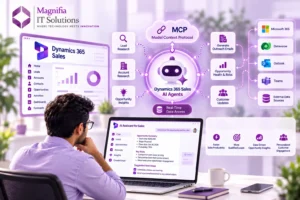
Sales Agent currently supports CRM systems including Microsoft Dynamics 365 Sales and Salesforce. It can help sellers search and synthesize CRM information using natural language.
For example, a salesperson could ask:
“Summarize my largest opportunities.”
“Which deals are at risk?”
“Prepare me for my meeting with this customer.”
“Show me recent customer interactions.”
“What are the next steps for this opportunity?”
“Create a follow-up email.”
Instead of manually opening multiple CRM records, Outlook messages, and Teams conversations, the seller can use conversational AI to obtain relevant information.
Sales AI and CRM Integration
One of the strongest advantages of Microsoft 365 Copilot for Sales is its ability to connect AI with CRM data.
When connected to Dynamics 365 Sales or Salesforce, Sales Agent can work with customer accounts, contacts, leads, opportunities, activities, and other configured CRM information.
Microsoft documentation states that Sales Agent can also use Microsoft Graph data such as Outlook emails, Teams meetings, Teams messages, and people information when the appropriate Microsoft 365 Copilot access is available.
This creates a more complete view of a customer.
Instead of looking only at CRM records, sellers can potentially combine structured CRM information with relevant business communications and meeting context.
That can help sales teams spend less time searching for information and more time engaging with customers.
Microsoft 365 Copilot for Customer Service
Customer service teams operate in a high-pressure environment where speed, accuracy, and customer experience are critical.
A service representative may need to review previous conversations, check open cases, search knowledge articles, understand customer history, and prepare a response before resolving an issue.
Service Agent is designed to assist with these tasks.
Microsoft describes Service Agent as a Microsoft 365 Copilot agent that can help customer service representatives find, summarize, and update customer service information using data from Dynamics 365 Customer Service and connected knowledge sources.
This can include tasks such as:
Summarizing customer cases.
Finding relevant knowledge.
Reviewing customer interactions.
Updating case information.
Adding notes.
Creating child cases.
Drafting customer communications.
Recommending next actions.
The result is a more connected customer service workflow.
Instead of switching between multiple applications, service professionals can use AI assistance while continuing to work within their normal business environment.
Service Agent Reaches General Availability
Microsoft announced that Service Agent reached general availability in Microsoft 365 Copilot in June 2026.
The expanded capabilities include knowledge discovery across sources such as Dataverse, SharePoint, and Microsoft 365, service actions, customer communication assistance, operational insights, governance controls, and extensibility.
For organizations investing in customer service transformation, this makes Microsoft Copilot more than a productivity chatbot. It becomes part of a broader AI-powered service strategy.
Microsoft 365 Copilot for Finance
Finance departments manage large amounts of structured information, including invoices, payments, customer accounts, supplier information, transactions, reconciliations, and financial reports.
Finance Agent is designed to bring ERP-connected information into the flow of work.
Microsoft describes Finance Agent as an experience that can connect with ERP systems and allow users to interact with financial information using natural language. Current ERP integration includes capabilities related to accounts receivable and accounts payable.
Finance teams can use AI to assist with tasks such as:
Reviewing customer account information.
Analyzing payment history.
Preparing financial summaries.
Identifying discrepancies.
Supporting reconciliation.
Preparing analysis-ready information.
Drafting finance-related communications.
Analyzing financial variations.
Microsoft’s announcement also highlighted capabilities such as financial reconciliation, variance analysis, and data preparation for finance professionals.
This can be particularly valuable for finance teams that spend significant time preparing information before analysis can even begin.
Microsoft Copilot and Dynamics 365
Microsoft Dynamics 365 plays an important role in this AI ecosystem because it provides business applications and structured business data that AI agents can work with.
Dynamics 365 Sales provides CRM data.
Dynamics 365 Customer Service provides customer service and case information.
Dynamics 365 Finance provides ERP and financial information.
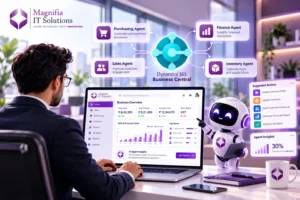
Dynamics 365 Business Central supports financial management, operations, inventory, purchasing, sales, and other business processes.
When these systems are connected to Microsoft Copilot, AI can become part of everyday business workflows.
For example, a sales manager could ask Copilot to summarize a customer’s latest activity.
A service manager could ask for open cases that require immediate attention.
A finance professional could investigate outstanding receivables.
The goal is not simply to generate text. The bigger opportunity is to connect AI with business information and workflows.
How Microsoft 365 Copilot Works Across Outlook, Teams and Excel
One of the strongest aspects of Microsoft 365 Copilot is that it operates within applications employees already use.
Outlook
Sales and service professionals can use AI assistance while working with emails and customer communications.
For example, Copilot can help summarize conversations, prepare responses, and provide contextual information.
Microsoft Teams
Teams is increasingly becoming a workspace for collaboration and AI-assisted business processes.
Sales professionals can use Copilot to prepare for meetings and understand customer context, while service and finance teams can use AI to collaborate around business information.
Excel
Finance professionals can benefit particularly from AI-assisted analysis in Excel.
Rather than manually preparing every analysis, users can increasingly use natural language to explore data, identify patterns, and create insights.
This makes Microsoft 365 Copilot particularly valuable because the AI is positioned inside the productivity environment instead of being a completely separate application.
What Is the Difference Between Copilot and Role-Based Agents?
A common question is whether Microsoft 365 Copilot and role-based agents are the same thing.
They are related, but their purpose is different.
Microsoft 365 Copilot provides a broad AI assistant experience across Microsoft 365.
Role-based agents are specialized experiences designed around particular business functions.
For example:
Microsoft 365 Copilot → General productivity and AI assistance.
Sales Agent → Sales and CRM workflows.
Service Agent → Customer service workflows.
Finance Agent → Financial and ERP workflows.
This specialization can make AI more useful because the agent understands the type of information and actions relevant to the employee’s role.
Microsoft 365 Copilot Licensing and Role-Based AI
Licensing is an important consideration for organizations planning a Copilot strategy.
Microsoft announced that role-based solutions for sales, service, and finance were being incorporated into Microsoft 365 Copilot rather than requiring the previous additional step-up approach for those capabilities. Microsoft stated that these role-based solutions would be available to Microsoft 365 Copilot customers through the Microsoft 365 Copilot Agent Store.
However, businesses should not interpret this as meaning that all Microsoft Copilot functionality is universally free.
Organizations still need to evaluate their Microsoft 365 licensing, Dynamics 365 licensing, connected CRM or ERP systems, user permissions, agent configuration, and applicable licensing requirements.
For example, Microsoft documentation states that Sales Agent is available to users with Microsoft 365 Copilot access, while specific scenarios can also depend on CRM licensing and configuration.
A proper licensing assessment should therefore be part of every Microsoft Copilot implementation project.
Microsoft 365 Copilot Updates in 2026
Microsoft’s 2026 release plans show that role-based AI is continuing to evolve.
For Sales Agent, Microsoft highlighted richer Sales Chat and Sales Home experiences, improved account and opportunity insights, contextual support in Outlook and Teams, improved email and meeting intelligence, and stronger governance and extensibility.
Microsoft is also expanding the ability to enrich sales experiences with information from additional sources. Its roadmap includes capabilities designed to bring information from non-CRM systems into account and opportunity summaries and meeting preparation.
This direction is important because business information rarely exists in a single system.
Customer information may be distributed across CRM, ERP, email, Teams, SharePoint, service systems, and external applications.
The future of enterprise AI is therefore increasingly about connecting these systems securely rather than simply generating content.
Benefits of Microsoft 365 Copilot for Businesses
Organizations implementing Microsoft Copilot can potentially achieve several business benefits.
Increased Productivity
Employees can reduce time spent searching for information and completing repetitive tasks.
Faster Decision-Making
AI can help summarize large amounts of information and highlight relevant insights.
Better Customer Engagement
Sales and service teams can access more customer context before meetings and interactions.
Improved Data Accessibility
Employees can interact with business information using natural language rather than learning complex reporting interfaces.
Reduced Manual Work
Tasks such as summarization, drafting, data preparation, and information retrieval can be assisted by AI.
Better Collaboration
Teams across sales, service, finance, and management can work from more accessible business information.
Challenges Businesses Should Consider
Microsoft 365 Copilot is powerful, but successful implementation requires more than simply enabling AI.
Businesses should first evaluate data quality.
If CRM or ERP information is incomplete, duplicated, or outdated, AI-generated results may not provide the expected business value.
Security is another major consideration.
Copilot and connected agents should respect existing permissions and access controls. Organizations need to understand which users can access specific business data and how agents are configured.
Businesses should also establish AI governance policies covering data security, responsible AI usage, human oversight, and monitoring.
Training is equally important.
Employees need to understand what Copilot can do, what information it can access, and when human review is required.
How to Prepare Your Business for Microsoft Copilot
A practical Microsoft Copilot implementation can follow several steps.
First, identify the business processes where employees spend the most time on repetitive information work.
Second, review your existing Microsoft 365, Dynamics 365, CRM, and ERP environment.
Third, assess data quality and security permissions.
Fourth, identify the most suitable role-based agents for your teams.
Fifth, start with a controlled pilot involving selected users.
Sixth, measure business outcomes such as productivity, response time, adoption, and process efficiency.
Finally, expand the implementation based on measurable results.
This approach is generally more effective than deploying AI across the organization without a clear business strategy.
Why Microsoft Copilot Matters for the Future of Business
The biggest change happening in enterprise software is the transition from applications that simply store information to systems that can help employees understand and act on that information.
Microsoft 365 Copilot represents an important part of this transformation.
Sales teams can use AI to understand opportunities.
Customer service teams can use AI to resolve customer issues.
Finance teams can use AI to analyze financial information.
Managers can use AI-generated insights to make better decisions.
And organizations can connect these experiences with business systems such as Dynamics 365, Salesforce, SAP, Dataverse, Microsoft Teams, Outlook, Excel, and SharePoint.
The 2026 direction from Microsoft shows that role-based AI is becoming increasingly specialized, connected, and action-oriented. Microsoft
Microsoft 365 Copilot Implementation with Magnifia IT Solutions
For businesses looking to adopt Microsoft 365 Copilot, Dynamics 365, AI agents, CRM automation, or ERP-connected AI, implementation should begin with the business problem rather than the technology alone.
Magnifia IT Solutions can help organizations evaluate their existing Microsoft ecosystem, identify suitable AI opportunities, plan Dynamics 365 and Microsoft 365 integrations, improve business workflows, and create a practical roadmap for AI adoption.
A successful Copilot strategy can connect people, business applications, data, and AI into a more intelligent digital workplace.
The goal is not simply to add another AI tool.
The goal is to create a business environment where employees can find information faster, automate repetitive work, make better decisions, and focus more time on customers and strategic activities.
Final Thoughts
Microsoft 365 Copilot is evolving rapidly in 2026, and role-based AI for sales, service, and finance is one of the most important developments for businesses adopting Microsoft technologies.
Sales Agent can help sellers work with CRM information and customer context.
Service Agent can help customer service teams find information, summarize cases, and take service actions.
Finance Agent can connect AI with ERP information and assist finance professionals with analysis and workflows.
Together, these capabilities demonstrate Microsoft’s broader vision for AI-powered business applications.
For organizations already using Microsoft 365, Dynamics 365, Salesforce, SAP, or other business platforms, now is a good time to evaluate where AI can deliver measurable productivity and operational improvements.
The companies that approach Microsoft Copilot strategically—with clean data, strong governance, clear use cases, and the right implementation partner—can turn AI from an experimental technology into a practical business advantage.
Ready to explore Microsoft 365 Copilot, Dynamics 365, and AI automation for your business? Connect with Magnifia IT Solutions to plan your AI and business application transformation strategy.