Field service management is changing rapidly. Businesses that rely on technicians, engineers, installers, maintenance teams, and mobile workers need more than traditional scheduling and work-order software. They need intelligent systems that can understand customer needs, optimize resources, support technicians, predict service requirements, and help teams make faster decisions.
This is where Dynamics 365 Field Service and AI are becoming increasingly important.
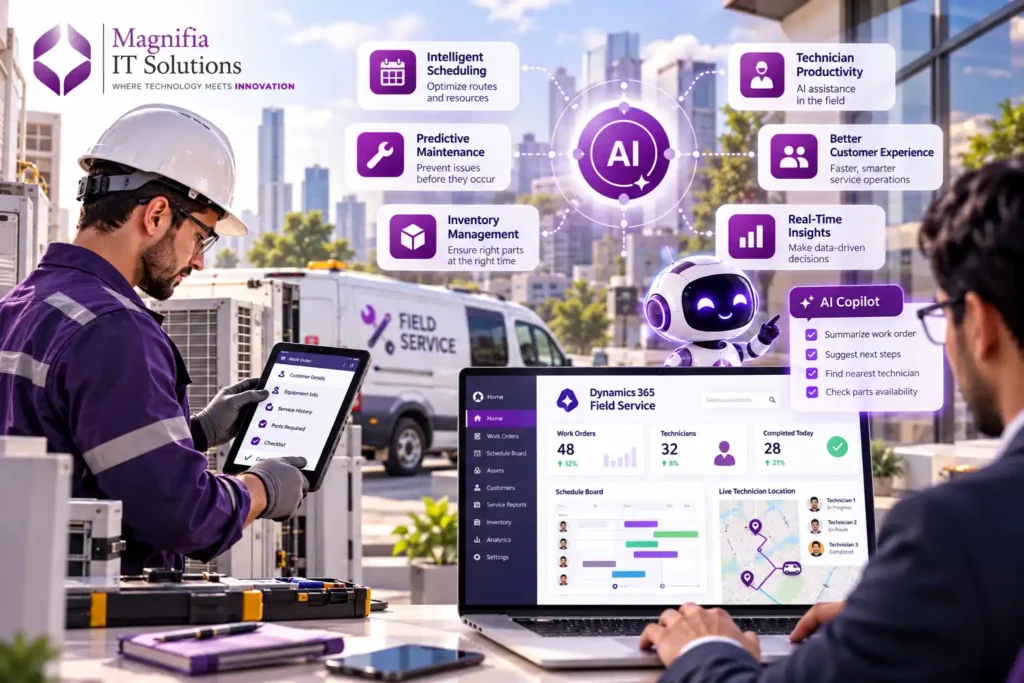
Microsoft Dynamics 365 Field Service combines field service management with artificial intelligence, automation, scheduling, mobile capabilities, connected devices, and business data. In 2026, Microsoft’s direction is increasingly focused on using AI and intelligent agents to automate field operations while helping dispatchers and technicians remain in control.
For organizations looking to modernize field operations, improve technician productivity, reduce service delays, and deliver better customer experiences, Dynamics 365 Field Service AI represents a significant opportunity.
What Is Dynamics 365 Field Service?
Dynamics 365 Field Service is Microsoft’s cloud-based field service management solution designed to help organizations manage technicians, work orders, customers, assets, resources, schedules, inventory, and service operations.
It is particularly useful for organizations where employees need to travel to customer locations to install, inspect, repair, maintain, or service equipment.
Typical industries include:
- Manufacturing
- Utilities
- Telecommunications
- Healthcare equipment
- Construction
- HVAC
- Electrical services
- Facilities management
- Industrial equipment
- Automotive services
- Professional maintenance services
Instead of managing field operations through spreadsheets, emails, phone calls, and disconnected applications, businesses can centralize their processes in Dynamics 365 Field Service.
The platform can connect customer information, work orders, assets, inventory, technicians, schedules, service history, and other business data.
AI adds another layer to this environment by helping users understand information and automate parts of the field service lifecycle.
Why AI Matters in Field Service Management
Traditional field service operations often involve hundreds or thousands of decisions every day.
Which technician should handle a job?
Which technician is closest to the customer?
Does the technician have the right skills?
Is the required inventory available?
Can the appointment be completed within the customer’s preferred time?
Which jobs should be prioritized?
Could a piece of equipment fail soon?
Which work orders require immediate attention?
When these decisions are handled manually, dispatchers and managers can spend significant time reviewing information and coordinating activities.
AI can help reduce this complexity.
Instead of simply displaying information, AI can analyze business data, identify patterns, generate recommendations, and assist employees with operational decisions.
This is one of the biggest changes taking place in modern AI-powered field service management.
Dynamics 365 Field Service and Microsoft Copilot
Microsoft Copilot is becoming an important part of the Dynamics 365 ecosystem.
In Field Service, Copilot can help employees interact with service information using natural language and reduce the amount of manual work involved in common activities.
For example, a service manager could ask for a summary of a work order instead of manually reviewing multiple fields.
A technician could use AI assistance to understand customer history, equipment information, previous repairs, or service instructions.
A dispatcher could use AI-generated information to better understand scheduling requirements.
The value of Copilot is not simply that it generates text. The larger opportunity is connecting AI assistance with actual business information.
When AI understands the context of a work order, customer, asset, technician, and service history, its assistance can become much more relevant.
AI-Powered Scheduling and Dispatch
Scheduling is one of the most important areas of field service management.
A single scheduling decision can affect technician utilization, customer satisfaction, travel time, overtime, and the number of jobs completed during a day.
Traditional scheduling often requires dispatchers to consider:
- Technician skills
- Location
- Availability
- Working hours
- Priority
- Customer preferences
- Required equipment
- Travel time
- Service duration
- Existing appointments
- Resource constraints
AI can help analyze these factors and recommend more effective schedules.
Dynamics 365 Field Service includes resource scheduling capabilities that help organizations match work orders with appropriate resources.
Microsoft’s 2026 roadmap also places increased emphasis on AI-assisted scheduling and the Scheduling Operations Agent, which is designed to help automate scheduling-related activities and improve resource utilization.
This could allow dispatchers to spend less time manually arranging appointments and more time handling exceptions and customer-critical situations.
Intelligent Work Order Management
Work orders are at the center of most field service operations.
A work order can contain information about the customer, location, asset, problem, priority, required products, technician, appointment, service history, and completion details.
Managing these records manually can be time-consuming.
AI can help summarize work orders and identify important information.
For example, instead of reading a long service history, a technician could receive a concise summary of:
- Previous service visits
- Reported problems
- Previous repairs
- Parts replaced
- Equipment history
- Recommended service actions
This can help technicians prepare before arriving at the customer location.
AI can also help organizations identify work orders that require additional attention.
For example, repeated failures, overdue maintenance, high-priority customers, or unresolved service problems could be highlighted for management review.
Improving Technician Productivity With AI
Technician productivity is one of the most important measurements in field service.
Technicians spend time traveling, diagnosing problems, searching for information, documenting work, communicating with customers, and completing service tasks.
AI can reduce some of the administrative burden.
A technician could use AI assistance to quickly find relevant information about an asset or service procedure.
After completing a job, AI could help create a service summary or draft notes based on information provided by the technician.
This can reduce the amount of time spent on documentation.
The objective is not to replace technicians.
Instead, AI should give technicians better information at the right time so they can complete work more efficiently.
For organizations with hundreds of mobile workers, even small productivity improvements can create significant operational benefits.
AI and Predictive Maintenance
One of the most valuable applications of AI in field service is predictive maintenance.
Traditional maintenance often follows one of two approaches.
The first is reactive maintenance, where equipment is repaired after it fails.
The second is preventive maintenance, where equipment is serviced according to a predefined schedule.
Predictive maintenance introduces a third approach.
AI can analyze information from connected assets, service history, sensor data, usage patterns, and other sources to identify potential issues before a failure occurs.
For example, if a machine begins showing unusual behavior, an organization may be able to identify the problem before the equipment completely fails.
This can help businesses reduce downtime, improve asset reliability, and plan maintenance more effectively.
When connected with Dynamics 365 Field Service, predictive insights can potentially lead to automatically created or recommended service activities.
Connected Assets and IoT
The Internet of Things is another important component of modern field service.
Connected equipment can continuously provide information about operating conditions.
Instead of waiting for customers to report a problem, organizations can receive information from equipment itself.
For example, a connected industrial machine could report abnormal temperature or performance.
An intelligent field service environment could then analyze that information and determine whether maintenance is required.
This creates a shift from reactive service toward proactive service.
The business can identify potential problems before customers experience a major failure.
For service organizations, this can become a major competitive advantage.
AI Agents and the Future of Field Service
The next stage of AI development is moving from assistants toward agents.
An AI assistant generally helps a user complete a task.
An AI agent can potentially coordinate multiple steps toward a defined objective.
This distinction is important for field service.
Imagine a customer reports a problem with a piece of equipment.
Instead of requiring an employee to manually perform every step, an AI agent could potentially help:
- Understand the customer’s issue.
- Review the asset history.
- Check previous service activity.
- Identify potential causes.
- Determine the required technician skills.
- Check technician availability.
- Review parts requirements.
- Recommend or initiate scheduling.
- Prepare customer communication.
- Update the relevant service information.
Human approval can remain part of important decisions.
This model could transform field service from a collection of manual tasks into a more intelligent, coordinated operation.
Dynamics 365 Field Service for Customer Experience
Customer experience is another major benefit of modern field service technology.
Customers want fast responses, accurate appointment times, professional technicians, and clear communication.
Poor scheduling or delayed communication can quickly lead to customer dissatisfaction.
AI can help organizations improve the customer experience by making service operations more responsive.
For example, intelligent scheduling can help match customers with available resources more efficiently.
AI-generated summaries can help service representatives understand customer history quickly.
Automated communications can help keep customers informed about appointments and service updates.
Predictive maintenance can help organizations address problems before they become major customer-impacting failures.
Together, these capabilities can create a more proactive service experience.
Mobile Field Service and AI
Field technicians are often away from the office.
They need access to information while working at customer locations.
The Dynamics 365 Field Service mobile experience is designed to give technicians access to relevant field service information while they are on the move.
Adding AI to this environment creates new possibilities.
Technicians can potentially access relevant information more quickly, understand work orders, review customer history, document service activities, and receive contextual assistance.
This is especially important for organizations where technicians work across multiple locations during the same day.
The less time technicians spend searching for information or completing administrative tasks, the more time they can spend solving customer problems.
Benefits of Dynamics 365 Field Service AI
Organizations adopting AI-powered field service management can potentially achieve several benefits.
Better Scheduling
AI-assisted scheduling can help organizations use technicians and resources more effectively.
Higher Technician Productivity
Technicians can spend less time on administration and information searching.
Faster Service Response
Organizations can identify and prioritize important service requirements more quickly.
Reduced Downtime
Predictive maintenance can help identify potential equipment problems before major failures occur.
Improved Customer Experience
Better scheduling, communication, and service preparation can improve customer satisfaction.
Lower Operational Costs
Better resource utilization and reduced unnecessary travel can help control service costs.
Better Business Visibility
Managers can gain a more complete understanding of field operations through centralized business information and analytics.
Dynamics 365 Field Service for Different Industries
The value of AI-powered field service differs depending on the industry.
Manufacturing
Manufacturers can use field service technology to manage equipment maintenance, service contracts, spare parts, and technician visits.
AI can help identify potential equipment problems and improve maintenance planning.
Utilities
Utility organizations can manage large numbers of assets and field workers.
AI-assisted scheduling can help coordinate technicians across geographically distributed locations.
Telecommunications
Telecommunications companies often manage large networks and infrastructure.
Field service automation can help coordinate installation, repairs, inspections, and maintenance.
Healthcare Equipment
Healthcare organizations and equipment providers need reliable maintenance for critical equipment.
Field service solutions can help track equipment history, service schedules, technicians, and parts.
HVAC and Facilities Management
HVAC and facilities companies can use Dynamics 365 Field Service to manage recurring maintenance, emergency repairs, technician schedules, and customer contracts.
AI can help prioritize jobs and improve technician utilization.
How to Implement Dynamics 365 Field Service AI
Implementing AI successfully requires more than turning on a Copilot feature.
Businesses should start by understanding their existing field service processes.
Identify where employees spend the most time.
Look for repetitive tasks.
Review scheduling problems.
Analyze customer service delays.
Identify areas where technicians struggle to access information.
Review the quality of asset and service data.
Then choose specific AI use cases.
A practical implementation approach can include:
Step 1: Analyze existing processes
Document scheduling, work-order management, dispatch, inventory, maintenance, and customer communication processes.
Step 2: Improve data quality
AI is only as useful as the information available to it.
Step 3: Select high-value use cases
Start with processes where AI can create measurable improvements.
Step 4: Configure Dynamics 365 Field Service
Set up customers, assets, resources, work orders, products, territories, and scheduling requirements.
Step 5: Introduce Copilot and AI capabilities
Enable appropriate AI functionality based on business requirements.
Step 6: Test with a pilot team
Start with a small group of technicians, dispatchers, or service managers.
Step 7: Measure results
Track productivity, response time, travel time, first-time fix rate, scheduling efficiency, and customer satisfaction.
Step 8: Expand gradually
Once the initial use cases demonstrate value, expand AI automation across additional processes.
Challenges Businesses Should Consider
AI-powered field service provides significant opportunities, but businesses should also consider the challenges.
Data quality is one of the biggest factors.
If customer records, asset information, technician skills, service history, and inventory information are incomplete, AI recommendations may not be reliable.
Security is equally important.
Field service systems can contain sensitive customer, operational, financial, and employee information.
Organizations should carefully configure permissions and ensure that employees and AI systems only have access to information they are authorized to use.
Human oversight is also important.
AI recommendations should be reviewed when decisions involve significant financial, safety, contractual, or customer-impacting consequences.
Businesses should also provide employee training.
Technicians and dispatchers need to understand how AI works, what it can do, and when human judgment should take priority.
Why 2026 Is an Important Year for Field Service AI
The field service industry is moving from basic digitalization toward intelligent automation.
Earlier field service systems focused primarily on digitizing paper processes.
Then organizations moved toward cloud-based scheduling, mobile applications, CRM integration, and connected assets.
Now AI is becoming another major layer.
The focus is shifting toward systems that can understand business context, recommend actions, automate repetitive processes, and support employees throughout the service lifecycle.
Microsoft’s 2026 direction for Dynamics 365 Field Service reflects this broader movement toward AI-assisted and agent-based business applications.
For organizations evaluating field service technology, this makes 2026 an important time to consider how AI can become part of their long-term service strategy.
The Future of Dynamics 365 Field Service
The future of field service will likely be increasingly proactive.
Instead of waiting for customers to report equipment failures, organizations will identify potential issues earlier.
Instead of manually creating every schedule, intelligent systems will help optimize resources.
Instead of technicians searching through multiple systems, AI will provide relevant information in context.
Instead of service representatives manually reviewing every customer interaction, AI will summarize important information.
Instead of managers relying only on historical reports, AI will increasingly help identify trends and recommended actions.
This does not mean humans become unnecessary.
In fact, human expertise becomes more important.
Technicians understand real-world equipment.
Dispatchers understand operational constraints.
Service managers understand customer relationships.
AI can support these professionals by reducing repetitive work and making relevant information easier to access.
How Magnifia IT Solutions Can Help
For businesses planning a Dynamics 365 Field Service implementation, AI transformation should be approached as a business strategy rather than simply a software deployment.
Magnifia IT Solutions can help organizations evaluate their existing field service processes, identify automation opportunities, plan Dynamics 365 solutions, integrate business applications, and develop practical AI adoption strategies.
The objective is to connect customers, technicians, assets, scheduling, business data, automation, and AI into one intelligent field service ecosystem.
Whether your organization is implementing Dynamics 365 Field Service for the first time, modernizing an existing field service environment, or looking to introduce AI into existing operations, the right roadmap can help maximize the value of the platform.
Conclusion
Dynamics 365 Field Service is becoming an increasingly intelligent platform for managing modern field operations.
With AI, Copilot, intelligent scheduling, mobile capabilities, connected assets, predictive maintenance, automation, and emerging AI agents, businesses can move beyond traditional field service management.
The biggest opportunity is not simply automating individual tasks.
It is creating a connected service operation where information flows between customers, technicians, assets, dispatchers, managers, and business systems.
Organizations that adopt this approach can potentially improve technician productivity, optimize scheduling, reduce service delays, improve customer experiences, and make better use of their field resources.
For companies considering Dynamics 365 Field Service in 2026, the question is no longer simply whether to digitize field operations.
The bigger question is how intelligently those operations can work.
With the right implementation strategy, clean data, strong governance, and carefully selected AI use cases, Dynamics 365 Field Service AI can become an important foundation for the next generation of field service management.
Ready to transform your field operations with Dynamics 365 and AI? Magnifia IT Solutions can help you plan, implement, integrate, and optimize a modern field service ecosystem built around your business goals.