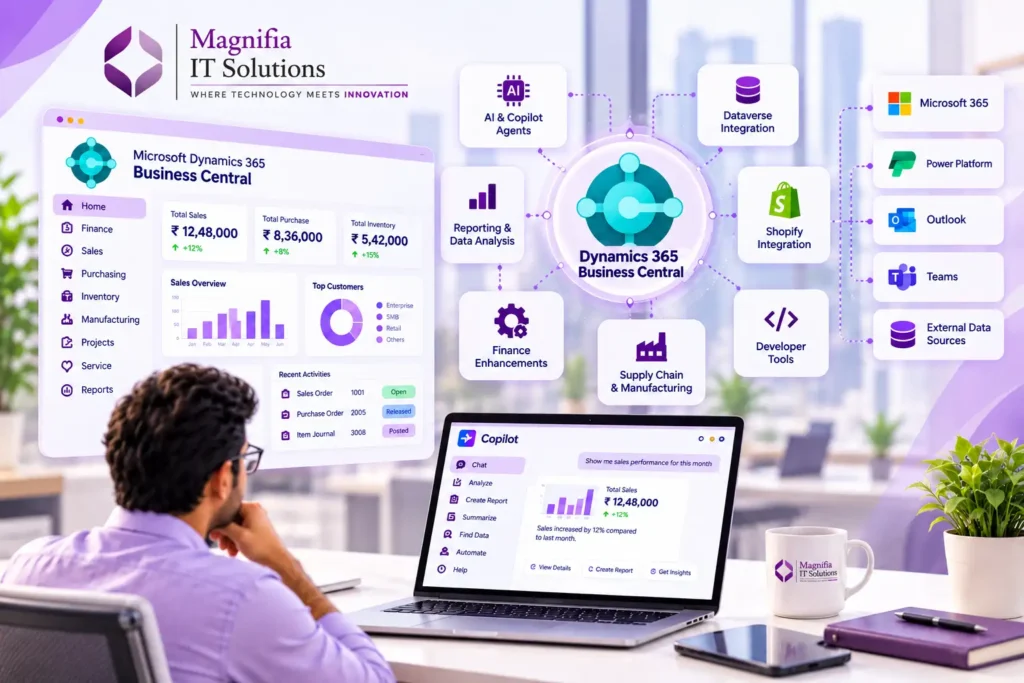
Microsoft Dynamics 365 Business Central 29.0 is the major update associated with the 2026 release wave 2, bringing new capabilities across artificial intelligence, Copilot and agents, Power Platform integration, ecommerce, finance, reporting, supply chain management, development, and the overall user experience.
The October 2026 update is particularly important for businesses that want to make their ERP environment more intelligent and connected. Business Central continues to expand its AI capabilities while improving integrations, reporting, ecommerce, finance, supply chain management, and developer tools.
Business Central 29.0 also reflects the growing role of AI in modern ERP systems. Businesses can use new AI-assisted capabilities to automate repetitive activities, work with business data more efficiently, and improve everyday decision-making.
In this guide, we explore the most important Business Central 29.0 features and what they mean for businesses planning an upgrade or a new implementation.
What Is Business Central 29.0?
Business Central 29.0 is the latest major version associated with the Dynamics 365 Business Central 2026 release wave 2.
The update introduces improvements across several important areas, including:
• Copilot and AI agents
• Power Platform and Dataverse
• Finance
• Ecommerce and Shopify
• Supply Chain Management
• Reporting and data analysis
• Development
• Administration
• User experience
• Sustainability Management
For organizations already using Business Central, the update provides opportunities to improve automation, productivity, reporting, integrations, and business processes.
1. Microsoft Copilot Gets a More Unified Experience
One of the biggest themes in Business Central 29.0 is the continued expansion of AI.
The new Copilot experience provides users with a more natural way to interact with Business Central information and business processes.
Instead of depending entirely on traditional navigation and manual searches, users can increasingly use AI-assisted interactions to understand business information, find relevant records, and perform certain tasks.
For organizations already using Microsoft 365 and other Dynamics 365 applications, this creates opportunities to build a more connected and intelligent business environment.
2. AI Agents Become More Practical
Business Central 29.0 expands the capabilities available for AI agents.
New improvements include:
• Better agent permissions management
• Improved agent task management
• Agent-generated content review
• Improved agent user experience
• Better purchase order matching
• Agent action review notifications
These improvements show how AI in Business Central is moving beyond simple assistance toward more structured business-process automation.
For businesses, AI agents can help reduce repetitive administrative work and allow employees to spend more time on analysis, customer service, and strategic activities.
3. MCP Capabilities for Business Data
Another important development in Business Central 29.0 is the continued expansion of MCP capabilities.
MCP, or Model Context Protocol, provides a framework that allows AI applications and agents to interact with business data and tools in a structured way.
This is particularly interesting for organizations exploring AI-powered business applications and intelligent automation.
For technology teams, MCP capabilities can become an important part of future AI integrations, allowing business applications and AI systems to work together more effectively.
4. Better Dataverse Integration
Business Central 29.0 also improves integration with Microsoft Dataverse.
Improved field mapping capabilities can make it easier for organizations to connect Business Central with other applications across the Microsoft business application ecosystem.
Dataverse provides a common data platform for many Microsoft applications, making stronger integration particularly useful for organizations running CRM, ERP, automation, and customer-facing applications.
For businesses with complex integration requirements, better Dataverse connectivity can help reduce data silos and improve information consistency.
5. Shopify Integration Gets More Capabilities
Business Central continues to improve its ecommerce capabilities through Shopify integration.
Business Central 29.0 introduces improvements such as:
• More control over sales document creation for Shopify orders and returns
• Improved Shopify connection management
• Support for Shopify B2B companies, catalogs, and pricing
• Better handling of order changes, exchanges, and refunds
• Improved synchronization of tariff numbers and origin information
These improvements can help ecommerce businesses connect their online storefront with their ERP operations more effectively.
With Business Central and Shopify working together, businesses can better manage products, inventory, orders, customers, pricing, and financial processes.
6. Improved Finance Capabilities
Business Central 29.0 also introduces improvements for financial management.
The update includes capabilities related to:
• Excise duties
• Withholding taxes
• Employee transactions
• Vendor-specific number series
• Self-billing invoices
• Financial reporting
These improvements are particularly useful for organizations with complex financial processes, taxation requirements, and invoicing workflows.
Businesses should always evaluate specific financial capabilities based on their country, localization, and regulatory requirements before implementing them.
7. Reporting and Data Analysis Improvements
Reporting is another important area of improvement in Business Central 29.0.
New capabilities provide businesses with more flexibility when creating, managing, and distributing reports.
Improvements include:
• Automated report outputs
• Bookmarked list views
• Bookmarked analysis tabs
• Report themes for branded documents
• Improved report layout management
• Enhanced Word-based reporting capabilities
• Reusable header and footer layouts
• Combining multiple financial reports into a single PDF
• Improved financial report tracing
• Better analysis capabilities
For finance and management teams, these improvements can reduce manual reporting work and make business information easier to understand and distribute.
8. Supply Chain and Manufacturing Improvements
Business Central 29.0 includes several improvements for supply chain and manufacturing operations.
The update provides capabilities related to:
• Subcontracting instructions
• Purchase orders
• Warehouse-enabled locations
• Direct transfer orders
• Quality testing and inspections
• Manufacturing documents
• Capacity calendars
• Inventory put-aways and picks
These improvements can help manufacturing and distribution businesses reduce manual processes and improve visibility across inventory, warehouse, purchasing, and production activities.
For organizations managing complex supply chains, these enhancements can contribute to more efficient operational workflows.
9. Developer Improvements in Business Central 29.0
Business Central 29.0 is not only focused on business users. Developers also receive new capabilities designed to improve development, testing, debugging, and deployment.
Some areas of improvement include:
• Better AL development capabilities
• Improved AL test suites
• Automated testing and CI/CD support
• Improved extension development workflows
• Better debugging capabilities
• AI-assisted development and debugging
• Improved MCP development capabilities
• Better compiler diagnostics
• Improved Visual Studio Code integration
• Enhanced tools for discovering Business Central objects
• Improved page scripting capabilities
These improvements can help development teams create, test, maintain, and deploy Business Central extensions more efficiently.
For organizations with customized Business Central environments, developer improvements can be particularly valuable when preparing for upgrades or implementing new functionality.
10. Improved User Experience
Business Central 29.0 also includes several improvements designed to make everyday work easier.
These improvements include:
• Recently searched items
• Recently used lookup items
• Improved image previews
• Better agent notifications
• Improved visibility of record creators and modifiers
Although these may appear to be smaller improvements individually, they can make daily navigation and productivity easier for Business Central users.
11. Sustainability Management Updates
Sustainability management continues to receive improvements in Business Central.
New capabilities cover areas such as:
• Carbon footprint calculations
• Sustainability ledger entries
• Fixed asset carbon tracking
• Item journal emissions
• Purchase document carbon calculations
• Item tracking and emissions management
These capabilities can help organizations integrate sustainability information into their operational and financial processes.
As businesses increasingly focus on environmental reporting and sustainability objectives, having sustainability information connected to ERP processes can become increasingly valuable.
Should Your Business Upgrade to Business Central 29.0?
Businesses already using Business Central should not treat an upgrade as simply installing a new software version.
Before upgrading, organizations should review their existing environment and prepare a structured upgrade plan.
Review Customizations
Check whether existing extensions, customizations, and third-party applications are compatible with Business Central 29.0.
Review Integrations
Evaluate integrations with CRM systems, ecommerce platforms, payment applications, Power Platform, Dataverse, banking systems, and other external applications.
Validate Data
Important master data and transactional data should be reviewed and validated before the upgrade.
Perform Testing
Test important business processes in a sandbox environment before applying the update to production.
Train Users
New AI, reporting, ecommerce, supply chain, and productivity capabilities may require additional employee training.
Review Security and Permissions
Businesses introducing AI agents and automated processes should carefully review permissions and access controls.
Business Central 29.0 Upgrade Process
A successful Business Central upgrade should follow a structured process.
A typical approach is:
Assessment → Sandbox Testing → Extension Validation → Integration Testing → User Acceptance Testing → Training → Production Upgrade → Post-Go-Live Support
This approach helps identify compatibility issues before they affect day-to-day business operations.
Businesses should also document their existing processes and identify which new Business Central 29.0 features could provide measurable improvements.
What Business Central 29.0 Means for Businesses
The biggest takeaway from Business Central 29.0 is the continued transformation of Business Central into a more connected and AI-assisted ERP platform.
AI agents, Copilot, MCP capabilities, Dataverse integration, Shopify improvements, advanced reporting, supply chain functionality, and developer tools all contribute to this direction.
However, simply upgrading to the latest version does not automatically create business value.
Organizations should identify where new capabilities can solve real business problems.
For example:
• Finance teams can improve reporting and financial workflows.
• Operations teams can improve supply chain processes.
• Ecommerce businesses can strengthen Shopify integration.
• Developers can improve extension development and testing.
• Management teams can access better reporting and analytics.
• IT teams can explore AI agents and intelligent integrations.
The goal should be to connect technology improvements with measurable business outcomes.
How Magnifia Can Help With Business Central
Implementing or upgrading Business Central requires more than technical configuration.
Businesses need to understand their existing processes, identify improvement opportunities, migrate data correctly, configure the platform, integrate external systems, test business scenarios, train users, and provide ongoing support.
Magnifia IT Solutions helps businesses with Microsoft Dynamics 365 consulting and implementation services, including ERP consulting, Business Central implementation, data migration, integrations, customization, upgrades, training, and ongoing support.
Our approach focuses on aligning Dynamics 365 with actual business requirements rather than simply implementing software.
If your organization is planning a Business Central 29.0 upgrade, migration, or new implementation, working with an experienced Dynamics 365 consulting team can help reduce implementation risks and improve user adoption.
Frequently Asked Questions
What is Business Central 29.0?
Business Central 29.0 is the major version associated with Dynamics 365 Business Central 2026 release wave 2 and brings improvements across AI, finance, reporting, ecommerce, supply chain, development, and user experience.
What are the biggest Business Central 29.0 features?
Some of the major areas include Copilot and AI agents, MCP capabilities, Dataverse integration, Shopify improvements, reporting, finance, supply chain management, developer tools, and user experience improvements.
Does Business Central 29.0 include AI features?
Yes. Business Central 29.0 expands AI capabilities through Copilot, AI agents, intelligent automation, and new ways of working with business data.
Should I upgrade to Business Central 29.0 immediately?
Businesses should first evaluate their extensions, customizations, integrations, and critical business processes. Testing in a sandbox environment before production deployment is recommended.
Can Magnifia help with Business Central implementation?
Yes. Magnifia provides Microsoft Dynamics 365 consulting and implementation services covering Business Central implementation, migration, integration, customization, upgrades, training, and ongoing support.
Conclusion
Dynamics 365 Business Central 29.0 represents an important step in the evolution of Microsoft’s ERP platform, particularly with the growing role of AI agents, Copilot, MCP capabilities, Dataverse, ecommerce integration, reporting, and supply chain functionality.
For businesses considering an upgrade, the October 2026 update provides opportunities to improve automation, productivity, reporting, integration, and operational efficiency.
However, successful adoption depends on more than upgrading the software. Businesses should evaluate their processes, test their environment, validate integrations, prepare users, and create a structured implementation or upgrade plan.
With the right strategy and implementation partner, Business Central 29.0 can become more than a software upgrade. It can be an opportunity to modernize business operations, improve productivity, and create a scalable foundation for future growth.
Planning a Microsoft Dynamics 365 Business Central implementation or upgrade? Explore Magnifia IT Solutions for ERP consulting, implementation, migration, integration, customization, and support.