Employee onboarding is one of the most important processes in the employee lifecycle, but it can also be one of the most administrative.
HR teams often need to create worker records, assign onboarding checklists, collect employee information, manage leave plans, enter compensation details, coordinate documents, and ensure that new employees complete important activities before and after their joining date.
At the same time, new employees expect a simple digital experience. They want to know what they need to complete, where to find important information, what documents they need to provide, and what happens next.
This is where the Dynamics 365 Human Resources Onboarding Agent introduces a new approach.
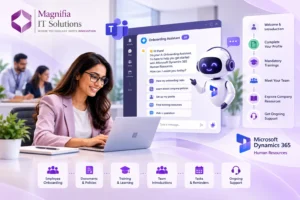
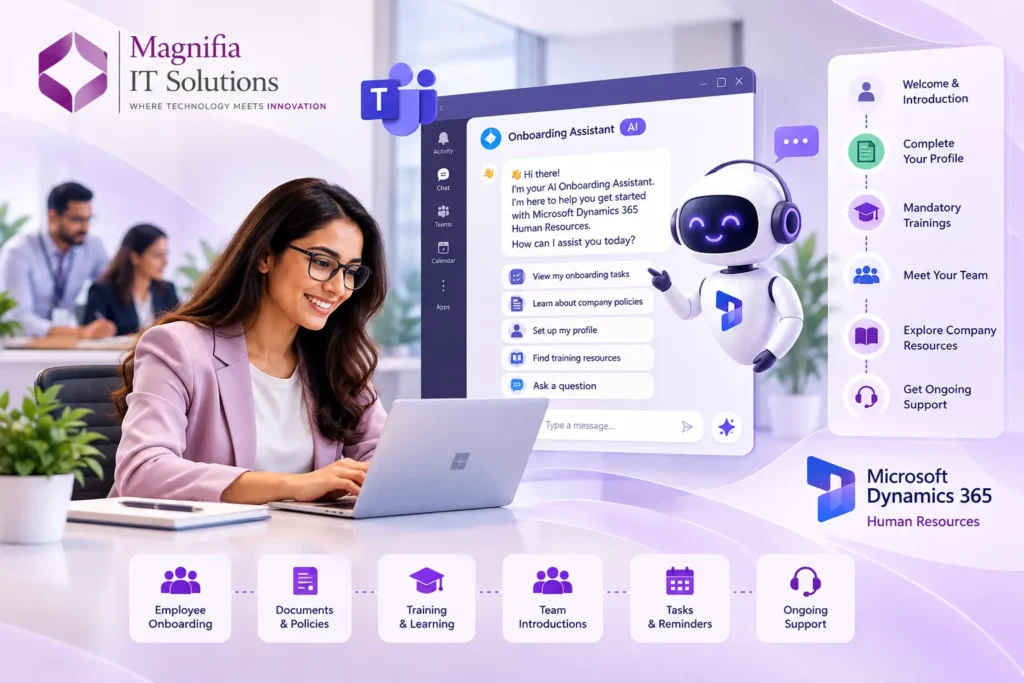
The AI-powered onboarding experience brings HR managers and new hires into a connected onboarding journey through Microsoft Teams. It can assist with routine onboarding activities, recommend relevant tasks, help capture employee information, and write confirmed information back to Dynamics 365 Human Resources. The current Onboarding Agent is available as a public preview capability, so organizations should evaluate preview limitations and readiness before using it in production. Microsoft Learn
For organizations looking to modernize HR operations in 2026, this represents an important step toward AI-powered employee onboarding.
What Is the Dynamics 365 Human Resources Onboarding Agent?
The Dynamics 365 Human Resources Onboarding Agent is a guided AI experience designed to coordinate onboarding activities for HR professionals and new employees.
Instead of requiring HR teams and employees to navigate multiple applications, the onboarding experience operates within Microsoft Teams.
The solution provides two connected experiences:
Onboarding Agent for HR Managers: Helps HR professionals create worker records, assign onboarding checklists, recommend leave plans, enter compensation information, and monitor onboarding progress.
Onboarding Agent for New Hires: Helps employees complete onboarding activities such as reviewing personal information, adding addresses and contacts, uploading identification documents, reviewing onboarding resources, and preparing a welcome or introduction email.
This two-sided approach is important because onboarding involves both HR and the employee.
Instead of treating onboarding as a collection of disconnected administrative tasks, the agent creates a more connected process between HR teams and new hires.
Why AI-Powered Employee Onboarding Matters in 2026
Traditional onboarding often involves a combination of HR systems, emails, spreadsheets, forms, documents, meetings, and manual data entry.
An HR manager might need to:
- Review candidate information
- Create a worker record
- Assign a position
- Select an onboarding checklist
- Assign a leave plan
- Enter compensation details
- Send onboarding instructions
- Track completion
- Follow up with the employee
- Verify submitted information
For a small number of employees, this may be manageable.
For organizations onboarding dozens or hundreds of employees, repetitive administration can quickly become a significant workload.
AI can help reduce some of this manual effort by assisting users with information capture, recommendations, task organization, and workflow coordination.
The goal is not simply to add a chatbot to HR.
The larger opportunity is to create an intelligent onboarding process where AI helps employees and HR professionals complete the right tasks at the right time.
How the Dynamics 365 HR Onboarding Agent Works
The onboarding process begins by using employee or candidate information already available in the Human Resources environment.
For HR managers, the agent can identify candidates whose joining dates fall within a configured onboarding window. For example, an organization can configure trigger lead days so that onboarding activities begin a defined number of days before the employee’s joining date.
The HR manager can then receive onboarding information within Teams.
The agent can assist with activities such as:
- Creating draft worker records
- Recommending onboarding checklists
- Recommending leave plans
- Entering compensation information
- Reviewing onboarding progress
- Managing multiple candidates
- Preparing employees for their first day
Importantly, the system is designed around review and confirmation.
The agent does not simply make uncontrolled changes to employee records. Recommendations and drafts can be reviewed by HR managers before information is committed to Dynamics 365 Human Resources.
This human-in-the-loop approach is particularly important for HR because employee information is sensitive and business processes often require approvals.
Onboarding Agent for HR Managers
HR managers often spend significant time completing repetitive onboarding activities.
The HR experience is designed to reduce this administrative workload.
Creating Worker Records
Instead of manually entering every field from scratch, the agent can help generate draft worker records based on available employee information.
HR professionals can review the information, make corrections, and confirm it before it is committed.
Recommending Onboarding Checklists
Different employees may require different onboarding activities.
A finance employee may require different training and access than a warehouse employee, consultant, manager, or technology professional.
The onboarding agent can recommend relevant checklists using employee and organizational information.
HR managers can review and modify these recommendations before confirming them.
Leave Plan Recommendations
Leave policies can vary depending on employee and organizational circumstances.
The agent can recommend appropriate leave plans based on available information, while HR professionals retain the ability to review and adjust the recommendation.
Compensation Information
Compensation information can be entered during the onboarding workflow.
Once confirmed, compensation information is available within Dynamics 365 Human Resources and can support downstream payroll preparation.
Multiple Employee Onboarding
Another useful capability is the ability to work with multiple candidates in a single workflow.
This can be particularly valuable for organizations with regular hiring cycles, graduate programs, seasonal hiring, or large workforce expansion.
Onboarding Agent for New Hires
Employee onboarding should not be designed only around HR requirements.
The new employee experience matters just as much.
The Onboarding Agent for new hires provides a guided experience through Teams where employees can complete relevant onboarding activities.
These can include:
- Reviewing personal details
- Adding address information
- Confirming contact information
- Uploading identification documents
- Reviewing onboarding resources
- Accessing learning materials
- Completing personalized onboarding tasks
- Preparing a self-introduction email
The agent can also use information collected during recruitment and information extracted from uploaded documents to reduce repetitive data entry. Employees can review extracted information and correct it before saving.
This creates a more convenient onboarding experience because employees can complete activities within the flow of work rather than switching between multiple systems.
Employee Onboarding in Microsoft Teams
One of the strongest aspects of the Dynamics 365 Human Resources Onboarding Agent is its Teams-based experience.
Employees already use collaboration platforms for communication, meetings, documents, and daily work.
Bringing onboarding into the same environment can reduce friction.
Instead of sending an employee a long email containing multiple instructions, HR can provide a guided onboarding experience where employees can see:
What do I need to complete?
What information do I need to provide?
Which documents do I need to upload?
What should I do next?
This can make onboarding easier to understand while reducing the number of manual follow-ups required from HR.
Intelligent Data Capture for HR
Data entry is one of the biggest sources of administrative effort during onboarding.
New employees may need to provide information that already exists elsewhere in the recruitment process.
The Onboarding Agent can use recruitment information and uploaded documents to help prefill or extract relevant information.
For example, an employee may upload an identification document.
Instead of requiring the employee to manually type every relevant detail, the agent can extract information from the document and present it for review.
The employee can then confirm or correct the information before it is saved.
This approach can help reduce repetitive data entry while keeping the employee involved in validating their information.
AI Recommendations for Onboarding
AI becomes particularly useful when onboarding processes become personalized.
Different employees have different roles, managers, organizations, legal entities, and onboarding requirements.
The Onboarding Agent can use available employee and organizational information to recommend relevant onboarding checklists and leave plans.
For example, a new project manager may need:
- Project management training
- Security access
- Team introductions
- Department orientation
- Compliance training
- Project methodology training
A new finance employee may require:
- Finance system access
- Financial policy training
- Compliance training
- Reporting training
- Department-specific onboarding
Rather than creating every onboarding workflow manually, AI-assisted recommendations can help HR teams start with a more relevant set of activities.
HR professionals can then review and adjust those recommendations before confirming them.
Connecting HR Onboarding with Finance
Employee onboarding does not stop with HR.
Compensation information, worker records, positions, leave plans, and other employee information can affect downstream business processes.
The Onboarding Agent is designed to write confirmed information back into Dynamics 365 Human Resources, while compensation information can flow toward Finance to support payroll readiness. Microsoft Learn
This connection can help reduce data duplication between HR and financial processes.
Instead of manually re-entering information across systems, organizations can establish a more connected employee lifecycle.
Key Benefits of the Dynamics 365 HR Onboarding Agent
1. Reduced Manual HR Work
Automating or assisting with repetitive activities can give HR professionals more time for strategic workforce activities.
2. Faster Employee Onboarding
New employees can complete required activities through a guided experience rather than relying on multiple emails and manual instructions.
3. Better Data Accuracy
Using existing recruitment information and structured data capture can reduce unnecessary manual entry.
4. Personalized Onboarding
AI-assisted recommendations can help tailor onboarding tasks according to employee and organizational information.
5. Improved Employee Experience
A guided onboarding journey can make it easier for employees to understand what they need to do.
6. Better HR Visibility
HR managers can access consolidated onboarding information and track progress across candidates.
7. Connected HR and Finance Processes
Confirmed compensation and employee information can support downstream financial and payroll processes.
8. Human Oversight
HR managers and employees can review and confirm information before changes are committed, providing an important control mechanism. Microsoft Learn
Practical Use Cases
The Dynamics 365 Human Resources Onboarding Agent can be useful across several business scenarios.
High-Volume Recruitment
Organizations hiring large numbers of employees can use AI-assisted workflows to reduce repetitive onboarding activities.
Graduate and Campus Hiring
Companies onboarding large groups of graduates can benefit from standardized onboarding checklists and guided employee experiences.
Remote Employee Onboarding
Teams can provide employees with a centralized digital onboarding experience even when they are not physically present in the office.
Global Workforce Onboarding
Organizations operating across multiple entities can use structured onboarding processes while maintaining appropriate organizational and employee information.
Internal Transfers
Employees moving between departments or roles may require new training, access, and organizational information.
Managed HR Operations
Businesses with centralized HR teams can use standardized onboarding workflows to create greater consistency across departments.
Security and Governance Considerations
HR systems contain highly sensitive information, including personal details, identification information, compensation, addresses, and employment records.
AI adoption therefore needs strong governance.
Organizations should define:
- Who can access onboarding information
- Which users can create worker records
- Who can approve changes
- Which documents can be uploaded
- How sensitive information is protected
- What actions require human confirmation
- Which security roles should be assigned
- How onboarding activity is monitored
The Onboarding Agent uses a review-and-confirm approach for important changes, helping ensure HR professionals remain involved in the process.
Organizations should also evaluate their existing security roles, Dataverse configuration, licensing, and environment architecture before implementation.
What Businesses Need Before Implementing the Onboarding Agent
The Onboarding Agent is currently a preview capability, so organizations should carefully evaluate its current functionality before planning production use.
The current prerequisites include a supported Dynamics 365 Human Resources environment, a connected Microsoft Dataverse environment, and an appropriate Copilot Studio license. The setup process also involves enabling the feature, installing the relevant solution, configuring flows and connection references, assigning security roles, and publishing the experience to Teams.
Businesses should therefore prepare their environment before beginning implementation.
Important preparation areas include:
- HR process mapping
- Employee data quality
- Security roles
- Dataverse configuration
- Onboarding checklists
- Recruitment data
- Leave plans
- Compensation processes
- Teams deployment
- User permissions
- AI governance
- Testing and user acceptance
How Magnifia IT Solutions Can Help
AI-powered HR transformation requires more than enabling an agent.
Organizations need the right combination of Dynamics 365 configuration, data, security, integrations, automation, and business process design.
At Magnifia IT Solutions, we help businesses modernize their Dynamics 365 environments and build solutions around real business requirements.
Our Dynamics 365 services include:
- Dynamics 365 Human Resources consulting
- HR solution implementation
- Employee onboarding automation
- Dynamics 365 configuration
- HR process optimization
- Data migration
- Power Platform integration
- AI and agent automation
- Microsoft Teams integration
- Workflow automation
- Customization and development
- Finance and HR integration
- User training
- Dynamics 365 support and managed services
For organizations exploring AI-powered employee onboarding, Magnifia can help evaluate existing HR processes, identify automation opportunities, prepare the Dynamics 365 environment, design onboarding workflows, configure integrations, and establish a scalable roadmap.
Why Choose Magnifia for Dynamics 365 HR Automation?
Every organization has different employee lifecycle processes.
A successful HR automation strategy should therefore begin with understanding how your organization actually hires, onboards, manages, and supports employees.
Magnifia takes a business-focused approach:
Discover: Understand your HR, recruitment, onboarding, and employee lifecycle processes.
Design: Create a Dynamics 365 HR solution aligned with your organizational requirements.
Configure: Set up Human Resources, onboarding processes, checklists, security, and workflows.
Integrate: Connect HR with Finance, Teams, Power Platform, and other business systems where required.
Automate: Identify repetitive activities that can benefit from AI and workflow automation.
Test: Validate processes, permissions, data, and employee experiences.
Train: Help HR teams and employees adopt the new solution.
Support: Provide ongoing optimization, troubleshooting, and managed services.
Frequently Asked Questions
What is the Dynamics 365 Human Resources Onboarding Agent?
It is an AI-assisted onboarding experience that helps HR managers and new employees complete onboarding activities through Microsoft Teams while connecting confirmed information back to Dynamics 365 Human Resources.
Can employees complete onboarding in Teams?
Yes. Both the HR manager and new-hire onboarding experiences are designed to run in Microsoft Teams.
Can the onboarding agent create employee records?
The HR experience can generate draft worker records based on available information. HR managers review and confirm the information before it is committed.
Can AI extract information from employee documents?
The new-hire experience can use information extracted from uploaded documents to reduce manual data entry. Employees can review and correct the information before saving it.
Can the onboarding agent recommend HR tasks?
Yes. The agent can recommend onboarding checklists and leave plans using employee and organizational information. HR managers can review and modify recommendations before confirming them.
Is the Dynamics 365 Human Resources Onboarding Agent available?
As of 2026, the Onboarding Agent is available as a public preview capability. Organizations should evaluate preview limitations and current availability before using it for production-critical HR processes.
What are the benefits of AI-powered employee onboarding?
AI-powered onboarding can reduce repetitive HR administration, improve data capture, provide personalized task recommendations, create a more guided employee experience, and help HR teams manage onboarding progress more efficiently.
Can Magnifia help implement Dynamics 365 Human Resources?
Yes. Magnifia IT Solutions can help with Dynamics 365 HR consulting, implementation, configuration, integrations, automation, data migration, training, customization, and ongoing support.
Conclusion
The Dynamics 365 Human Resources Onboarding Agent represents an important step toward AI-powered employee onboarding in 2026.
Instead of relying entirely on manual forms, emails, spreadsheets, and repetitive data entry, organizations can use an AI-assisted experience to guide HR professionals and new employees through onboarding activities.
HR managers can receive assistance with worker records, onboarding checklists, leave plans, compensation information, and progress tracking. New employees can complete personal information, document submission, onboarding resources, and other day-one activities through Teams.
The most important advantage is the connection between AI assistance and the HR system of record. Confirmed information can flow back into Dynamics 365 Human Resources, helping maintain more consistent employee records and supporting downstream business processes. Microsoft Learn
However, successful adoption requires more than enabling an AI agent. Businesses need clean employee data, well-designed onboarding processes, appropriate security, clear approval workflows, strong governance, and a properly configured Dynamics 365 environment.
Magnifia IT Solutions can help your organization move toward a smarter, more connected HR operation. From Dynamics 365 Human Resources consulting and implementation to AI onboarding, automation, Teams integration, data migration, customization, training, and ongoing support, our team can help you build an employee experience designed for the future of work.
Ready to modernize your employee onboarding process? Contact Magnifia IT Solutions today and discover how Dynamics 365 Human Resources and AI-powered automation can help your HR team work smarter, onboard employees faster, and create a better employee experience.